



CFD Trading · Advanced · 13 min read
Day Trade Only on Phone: Practical Limits and Setup Guide
The core challenge: why phone-only day trading demands compromise
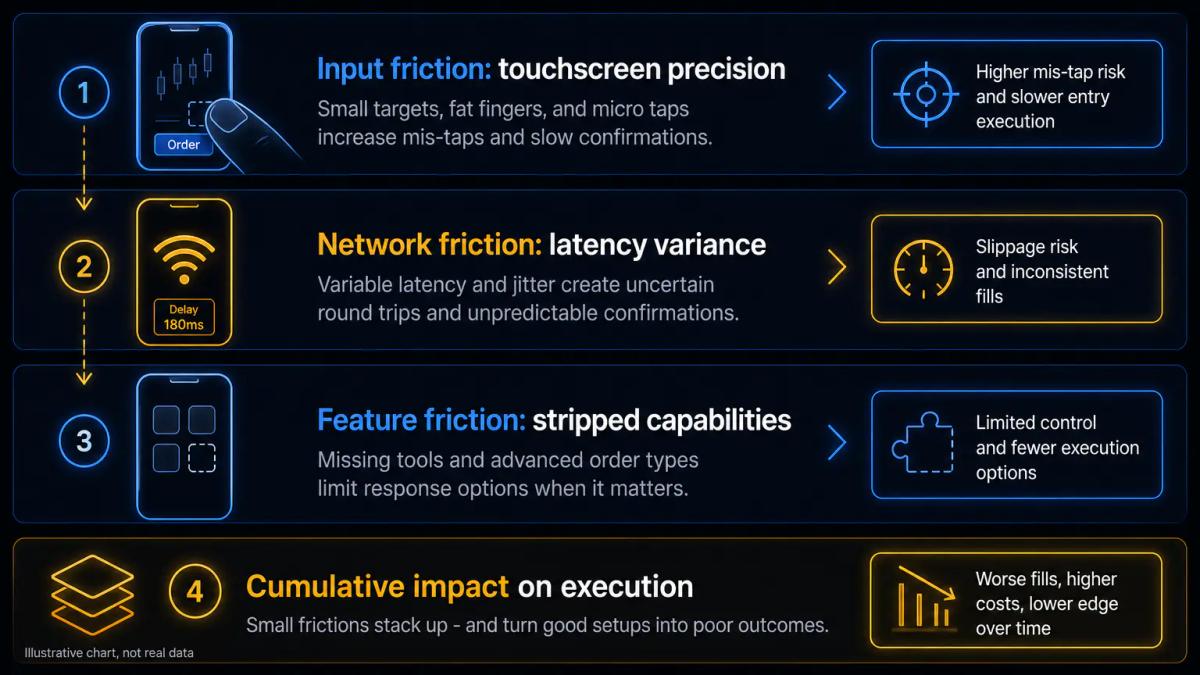
Running a full day-trading workflow from a handset is possible, provided you accept friction at every stage. The handset becomes your execution surface, your analysis surface and your risk-management surface, all at once, and each role carries a different penalty when something slips. You can open, manage and close positions from a phone across any session, though consistent profitability becomes a harder ask once the structural constraints stack up.
The compromise sits at three layers:
- Input layer: a 6-inch touchscreen is a worse surface for placing orders near a precise price than a mouse on a 27-inch monitor.
- Transport layer: a cellular connection fluctuates with signal strength, cell load and handoffs between towers, while a wired desktop line is effectively flat.
- Software layer: mobile apps from the same broker usually ship fewer order types, fewer concurrent charts and a smaller indicator library than their desktop counterparts.
Mobile still has its place; what changes is the realistic scope of what you can trade from one. Scalping a one-minute chart on an illiquid cross will punish you, while working a pre-planned bracket on a liquid index future from an airport lounge sits well within the medium. The relevant question for a mobile-only workflow is whether your strategy tolerates the specific frictions a phone introduces. Any edge that depends on sub-second entries, several synchronised timeframes or fast re-plotting of levels will be eroded by the handset long before the market has a chance to do it.
The rest of this article walks through those frictions concretely: platform parity, chart readability, latency, regulatory boundaries, risk controls, the strategies that survive on mobile, and the hardware setup that keeps the handicap manageable.
Putting this into practice means opening an account: start with the best forex brokers our team reviewed.
Mobile platforms and apps: what you actually get
Most regulated brokers ship iOS and Android apps with core features:
- Real-time quotes and order entry.
- Native charting and account management.
- MetaTrader 4 and MetaTrader 5 on mobile, a full mobile cTrader client, and TradingView's app syncing watchlists and alerts across devices.
Feature parity with desktop is rare, and you lose simultaneous multi-timeframe layouts, several conditional order types, Expert Advisors (automated strategies that execute code on the chart), and most third-party indicators that rely on desktop plug-ins.
What survives the port, and what does not, varies by platform. The grid below reflects the current feature set on the main day-trading apps.
| Feature | MT4 mobile | MT5 mobile | cTrader mobile | TradingView app |
|---|---|---|---|---|
| Order types | Market, limit, stop | Market, limit, stop, stop-limit | Market, limit, stop, stop-limit, OCO | Depends on connected broker |
| Expert Advisors | No | No | cBots: no | No |
| Custom indicators | No | No | No | Yes, Pine Script indicators load |
| Simultaneous charts on screen | 1 | 1 | 1 | 1 |
| Depth of Market | No | Yes | Yes | Varies |
| Chart timeframes | 9 | 21 | All standard | All standard |
| Native alerts | Price only | Price only | Price, server-side | Price, indicator-based, server-side |
The practical consequence is that trading with just an app often means pre-building the analysis on a desktop or tablet session, then using the phone as the execution and monitoring surface. Alerts become the connective tissue: you set the condition when you have a proper screen, and the phone handles the trigger. Attempting full discretionary analysis on the handset, drawing fresh structure in real time while a position is live, is where most of the mistakes happen.
Broker native apps sit alongside these third-party clients and sometimes beat them for a specific instrument set, especially equities and ETFs where the broker handles routing directly. For CFDs and forex, MT5 and cTrader remain the common denominators.
Screen size and chart readability: the hidden friction
A phone screen between 5 and 6.7 inches compresses price action and limits how much historical context sits in view. On a 15-minute chart, a 6.1-inch display typically shows between 40 and 70 candles comfortably, while a 27-inch desktop monitor shows several hundred without zooming. The structural read suffers in ways that go well beyond aesthetics: the swing high from three sessions ago, the volume cluster around a previous value area, the trendline that only reveals itself with 200 bars of context all drop out of the frame.
Interaction compounds the problem, because zooming in and out to switch between the trigger timeframe and the structural one breaks flow and introduces input errors. Drawing a trendline with a fingertip across a 6-inch surface rarely lands on the exact wick you intended; a stylus with an active digitiser helps, but even then precision near tight support and resistance is lower than with a mouse. Placing a stop or a limit order by dragging a line on the chart, a common desktop workflow, is noticeably slower on touch.
Tablets reduce the pain without eliminating it. A 12.9-inch iPad or an 11-inch Android tablet shows roughly three times the chart area of a flagship phone, enough for one properly-scaled chart with indicators and a readable DOM. If the article's premise is strictly phone-only, you accept that compression as a permanent cost and build a strategy that does not depend on reading fine structure.
Network latency and execution risk on mobile
Mobile networks introduce variable round-trip times that a wired desktop line does not. A fibre connection to a broker's gateway typically runs in the low tens of milliseconds and stays stable; 4G LTE in good conditions sits in the 40 to 70 millisecond range, 5G can drop into the 20 to 40 range, and public WiFi varies wildly depending on contention. For day trading, the variance of those numbers does more damage than the raw average, since an edge priced on tight ranges cannot absorb a sudden spike.
Consider a swing position held across several days: a 100 millisecond delay on entry is lost in the noise of the move. The same delay turns material once you scalp tight ranges where the next tick has already passed through your intended fill, or when a news release moves price several pips in the window between tap and acknowledgement. Slippage on market orders widens because the quote you saw was already stale by the time your packet reached the server, and limit orders mitigate that at the cost of missed entries when price trades through your level without filling.
Network handoffs are the second-order risk. Should the phone switch from WiFi to cellular mid-trade, or jump from one cell tower to another on the move, the session can drop briefly and re-authenticate. During that gap, any pending order sits safely on the broker's server and executes normally, while any manual action you were about to take is suspended. Server-side stops and take-profits therefore become mandatory on mobile, because a client-side stop that lives only inside the app disappears the moment the app does.
Battery state and background throttling add a layer that desktop traders never meet. iOS and Android aggressively suspend apps that lose focus, so a trading app in the background may stop pushing price updates until you reopen it. Keeping the app foregrounded, disabling low-power mode and allowing background refresh for the broker app are small settings with real execution consequences.
Pattern day trader rules and regulatory friction
Regulatory perimeters apply to the account, not to the device you use to reach it. In the United States, FINRA's pattern day trader rule classifies any margin account that executes four or more day trades in equities or equity options within five business days as a PDT, and requires a minimum equity of $25,000 to continue day trading. Because the rule attaches to the account rather than the hardware, a phone-only workflow faces identical thresholds to a desktop one.
In the United Kingdom, the FCA caps leverage for retail clients at 1:30 on major currency pairs, 1:20 on major indices and gold, 1:10 on non-major indices and commodities, 1:5 on individual equities, and 1:2 on cryptoassets where offered to professionals; CFDs on cryptoassets are banned for UK retail. ESMA applies the same leverage ladder across the EU for retail clients. ASIC enforces an equivalent framework for Australian retail CFD clients. The compliance picture by jurisdiction is below.
| Jurisdiction | Day-trading minimum | Max retail leverage, majors FX | Max retail leverage, equities | Crypto CFDs for retail |
|---|---|---|---|---|
| United States | $25,000 for PDT in margin accounts | Varies by instrument, CFTC/NFA regulated | Full margin per Reg T on equities | Limited, exchange-traded only |
| United Kingdom | None statutory | 1:30 | 1:5 | Banned for retail |
| European Union | None statutory | 1:30 | 1:5 | Restricted, mostly unavailable retail |
| Australia | None statutory | 1:30 | 1:5 | Restricted |
UK retail onboarding typically goes through an FCA-authorised entity of the broker group; some brokers also run offshore entities under lighter licences and route non-UK clients there. The entity on your contract determines which leverage ladder and which investor compensation scheme apply, regardless of whether the app looks identical.
Risk management on a small screen
Risk management on a phone is more error-prone than on a desktop and benefits from pre-commitment. Common mobile mistakes include:
- A mistapped position size, often one digit off from the intended lot count.
- A stop placed one zero away from the price you meant to defend.
- A long opened when you meant to go short, because the direction toggle sits inches from the confirm button.
A mouse-and-keyboard workflow catches most of those inputs with confirmation dialogs and visual anchors, while a thumb on a 6-inch screen does not. The mitigations have to be structural:
- Pre-plan every trade on the largest screen available. Decide entry, stop, target and size before the session, not during it.
- Use server-side orders for stops and take-profits. A client-side stop evaporates with the app; a broker-side bracket survives app crashes, battery depletion and network drops.
- Set price alerts above and below the current level for every instrument you watch, so you do not need to stare at the chart to notice a break.
- Standardise position size per instrument. If every EURUSD trade is a fixed 0.1 lot and every DAX trade is a fixed 0.2 lot, there is no size field to fat-finger.
- Enable the broker's two-step confirmation on order submission. The extra tap is worth the error rate it prevents.
- Keep the number of concurrent positions low. Managing three positions on a phone is roughly the cognitive load of managing six on a desktop.
Suppose you plan a long on US500 with entry at 5,420, stop at 5,410 and target at 5,445, sized at 0.3 lots. You enter the bracket from your phone during a commute. Two hours later your phone drops signal in a tunnel for four minutes. Because the stop and target live on the broker's server, price can touch either level and the position closes without your involvement; if either were a mental stop you intended to execute manually, you would have been offline for the move.
The underlying discipline here is the same one any serious trader applies on desktop; mobile simply raises the cost of letting it slip.
When phone-only day trading can work
Phone trading suits a specific profile. Traders who scalp liquid instruments with tight predefined stops, who work from pre-built analysis, and who tolerate a slightly wider effective spread to compensate for execution latency, can operate from a handset without destroying their edge. The common denominator is liquidity:
- EURUSD, USDJPY, GBPUSD.
- The S&P 500 index and its futures proxies.
- Large-cap US tech names.
- Gold.
On these instruments, a 50 to 100 millisecond latency penalty is absorbed by tight book depth.
Everything flips at the other end of the liquidity curve. Thin markets, exotic forex crosses, small-cap stocks outside RTH, meme-flow sessions and news-driven windows amplify every mobile handicap: spreads widen, book depth evaporates, and slippage on market orders can swallow a scalper's expected value in a single fill. An edge that lives on second-tier instruments effectively requires a desktop setup to survive.
Strategy style weighs as heavily as instrument on the outcome. Approaches that survive on mobile share a few traits:
- Fewer, higher-conviction setups per session, with no high-frequency scanning.
- Entries placed as limits at pre-identified levels, with no market orders chasing momentum.
- Server-side brackets handling the exits.
- A holding window measured in minutes to hours.
- Instruments the trader already knows cold, so chart context on a small screen is less punishing.
Styles that struggle include tape-reading scalps that depend on live DOM interpretation, pairs trading that requires two synchronised charts in view, and anything built on scanning dozens of tickers for intraday breakouts.
Imagine two traders over a six-month window on identical capital. The first scalps minor forex pairs on a one-minute chart from a phone, hunting 5-pip moves; realised slippage and missed fills quietly compress the win rate below breakeven. The second trades two or three index CFD setups per day with 20-point stops, limit entries and server-side targets from the same phone; the latency penalty becomes a rounding error against the trade's risk. The device is identical in both cases, and the outcomes diverge because each strategy tolerates the medium differently.
Practical setup: hardware and connectivity tips
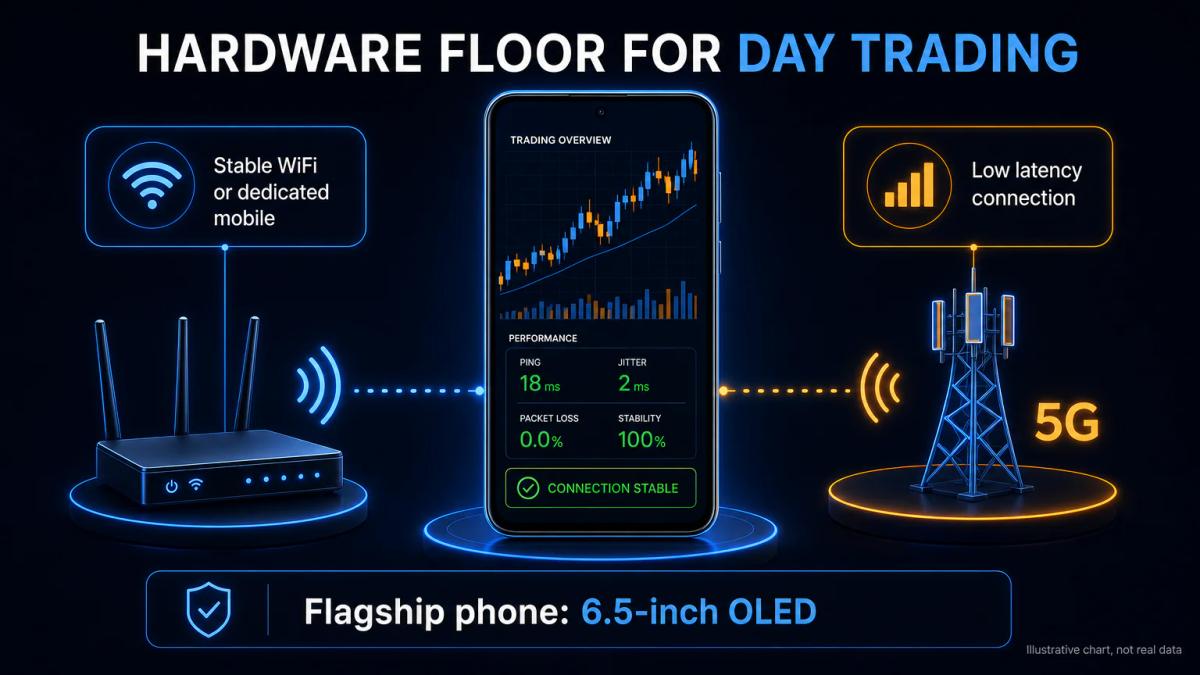
The hardware floor for phone-only day trading is higher than most app store screenshots suggest. The goal is a setup where the phone is not the weakest link in the chain between your intention and the broker's matching engine.
A realistic baseline looks like this:
- A recent flagship with a 6.5-inch or larger OLED screen: iPhone 14 Pro Max, iPhone 15 Pro Max, Samsung Galaxy S23 Ultra, S24 Ultra, Google Pixel 8 Pro or equivalent. Older or budget devices work for monitoring but suffer on chart redraws under load.
- A primary connection on fixed WiFi backed by a wired router, with a 5G mobile hotspot as failover. Public WiFi is never the primary.
- An eSIM or secondary SIM on a different carrier, so a single network outage does not strand you.
- A phone stand or mount at reading height, so you are not holding the device for hours; wrist and neck fatigue degrade decision quality on long sessions.
- An active-digitiser stylus for Samsung devices or an Apple Pencil-compatible setup for iPad fallback, when precise chart interaction is unavoidable.
- A power bank or constant charging during sessions; a device throttled by low battery mode will suspend background updates.
- Push notifications enabled for the broker app, with Do Not Disturb overrides so alerts fire through focus modes.
- Biometric login enabled, so re-authenticating after a session drop takes one second under pressure.
Before risking live capital, pressure-test the setup. Open a demo account at the broker you intend to use, run a full week of your real strategy on the phone, and measure three things specifically: how often the app disconnects or stalls, how often an order confirmation lags more than a second, and how often you misinput a field. If any of those happens more than occasionally, the setup is not ready.
Keeping a tablet or laptop within reach as backup belongs inside the phone-only setup rather than against it, in the same way a spare tyre belongs in a car. The moment the phone's battery, screen or network fails during a live position, having a server-side bracket already in place and a second device nearby is what separates a bad session from a blown account.
For a concrete example of costs and platform, the Tickmill review goes through them line by line.
Frequently Asked Questions
Can you day trade on a phone and make consistent profit?
Yes, within a narrow strategy band. Traders who work pre-planned entries on liquid instruments, use server-side brackets and accept slightly wider effective spreads can profit from a phone. Scalpers chasing seconds-long moves on thin markets will see latency and screen compression erode any edge.
What is the best day trading app for iPhone or Android?
There is no single answer: for forex and CFDs, MT5 and cTrader mobile cover most needs; for charting and alerts, TradingView's app is strongest; for equities, broker-native apps usually route and report better. The best app is the one tied to the regulated broker and the instruments you actually trade.
Do you need a minimum account balance to day trade on mobile?
In the US, FINRA's pattern day trader rule requires $25,000 in a margin account to day trade equities and equity options, regardless of device. In the UK and EU there is no statutory day-trading minimum, but FCA and ESMA leverage caps apply, and most CFD brokers set their own practical minimums starting around $100 to $500.
How does network latency affect day trading on a phone?
Mobile connections add roughly 30 to 70 milliseconds over a wired desktop line and introduce variance from cell handoffs and signal fluctuation. For swing trades it is irrelevant; for scalping tight ranges it causes slippage on market orders and missed fills on limit orders. 5G on a stable signal mitigates it, public WiFi makes it worse.
What are the main drawbacks of phone-only day trading compared to desktop?
Three structural costs: smaller charts show less historical context and make precise order placement fiddly; mobile networks add latency and variance; mobile apps strip features like multi-chart layouts, Expert Advisors and most custom indicators. The combination handicaps high-frequency, discretionary and multi-instrument styles far more than slower, pre-planned ones.
About the authors


Put this into practice
Brokers we have reviewed
Scored on the same five dimensions. Here are three of them — the full list is on the brokers page.



Related articles

Day Trading Complete Guide: Strategies, Indicators, and Tips for Beginners
Day Trading Complete Guide: Learn how day trading works with proven strategies, key indicators, stock screening and risk management tips for beginners.

Forex Broker Comparison Metrics to Look Out For

Forex Spread Explained: What It Costs You on Every Trade
A plain-English guide to the forex spread: what it is, how to calculate the cost of one, and how it shapes the profitability of your trading strategy.
0 comments