



How to Trade · Advanced · 8 min read
Custom Indicator (MQL4, MQL5): Structure, Setup, and Code
What a custom indicator is and why you'd code one
A custom indicator in MQL4 or MQL5 is a program you write to calculate and display price-based signals on your MetaTrader chart that the platform's built-in indicators don't offer. You build it by defining calculation logic, attaching it to price data via buffers, and styling how it appears on screen. Traders code custom indicators to test proprietary strategies, combine multiple signals into one visual, or automate analysis that would otherwise take manual work.
The economic case for coding a trading indicator comes down to control. You own the formula, you can adjust the calculation window on a per-symbol basis, and you can expose the output to an Expert Advisor without paying royalty fees or accepting closed-source .ex5 binaries. If you plan to build your own MT4 indicator alongside an MT5 version, expect to maintain two codebases with shared logic but different property setters and buffer semantics.
Putting this into practice means opening an account: start with the best forex brokers our team reviewed.
The anatomy of an MQL4 and MQL5 indicator
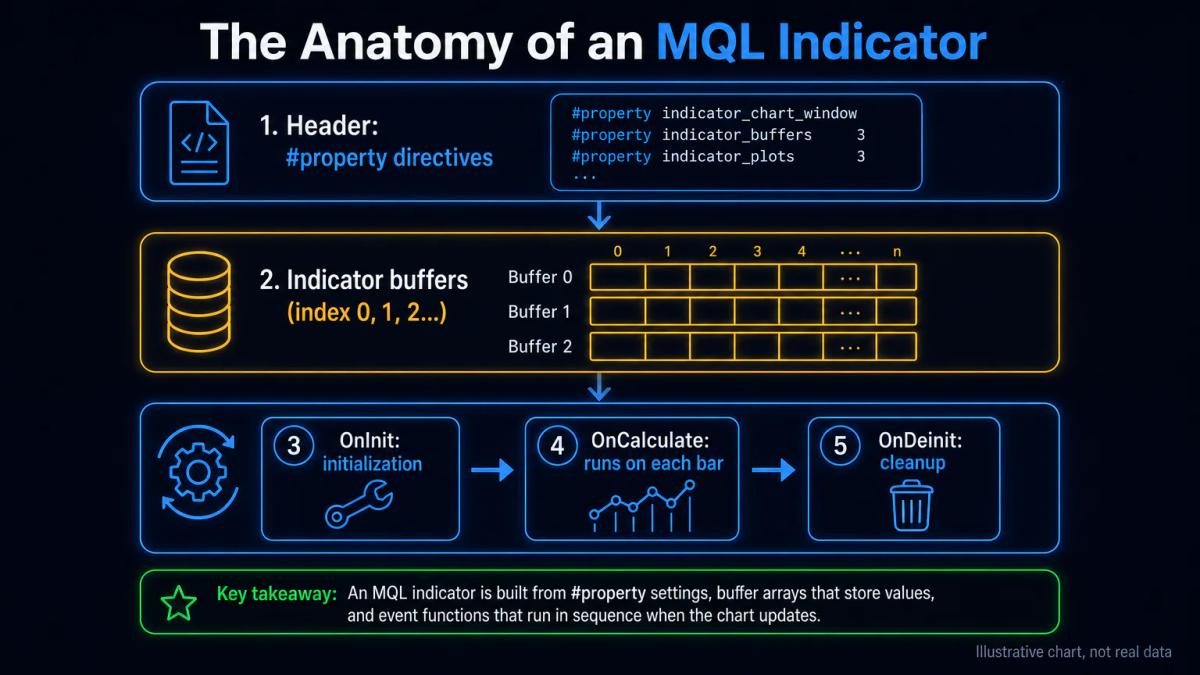
Both MQL4 and MQL5 indicators follow a standard structure: a header section declaring properties, one or more indicator buffers to store calculated values, and event functions that run when the chart updates. One notable divergence is that MQL5 uses separate functions like IndicatorSetDouble and IndicatorSetInteger to configure properties, whereas MQL4 bundles many settings into init() and the #property preprocessor directives.
An MQL4 file typically opens with directives such as #property indicator_chart_window and #property indicator_buffers 2, followed by per-buffer colour and style declarations. Historically, the init() function handled buffer registration through SetIndexBuffer, index styling through SetIndexStyle, and label naming through SetIndexLabel. Bar iteration was driven by start() in legacy code, and newer builds have replaced it with OnCalculate.
MQL5 tightens the model considerably. Buffer declarations use #property indicator_buffers and #property indicator_plots as separate directives, because a single plot can be composed of several buffers (an arrow needs one, whereas a candle plot needs four). Visual properties are registered at runtime through the PlotIndexSet* family, while global metadata such as digits and short name comes from IndicatorSetInteger(INDICATOR_DIGITS, _Digits) and IndicatorSetString(INDICATOR_SHORTNAME, "MyInd"). The separation is verbose, though it eliminates most silent-fail cases where a buffer displays as zero because its plot was never registered.
Core functions: SetIndexBuffer, OnCalculate, and iCustom
Three functions form the backbone of any working custom indicator:
- SetIndexBuffer attaches an array to a visual line on your chart.
- OnCalculate runs every time a new bar forms or price ticks, performing your calculation logic.
- iCustom lets you call your custom indicator from an Expert Advisor or another indicator, passing parameters and retrieving its output.
In MQL4, SetIndexBuffer(0, MyBuffer) maps index 0 to your double array; the array is automatically sized to the chart's bar count and indexed as a time series (index 0 = current bar). In MQL5, the same call takes an optional third parameter (INDICATOR_DATA, INDICATOR_CALCULATIONS or INDICATOR_COLOR_INDEX), and buffers are indexed left to right by default, so you must call ArraySetAsSeries(MyBuffer, true) whenever you want the MQL4-style indexing.
OnCalculate receives the total bar count (rates_total) and the count already calculated (prev_calculated). A sound optimisation pattern is to start the loop at prev_calculated == 0 ? 0 : prev_calculated - 1 and iterate up to rates_total - 1, so that a fresh attach recomputes everything while every subsequent tick only touches the current bar. Always return rates_total at the end, since returning zero forces a full recompute on the next tick and destroys performance.
In MQL4, iCustom returns a value directly, as in double val = iCustom(NULL, 0, "MyInd", InputParam1, InputParam2, bufferIndex, shift). In MQL5 the signature changes so that iCustom returns a handle, and values are retrieved via CopyBuffer(handle, bufferIndex, startPos, count, destArray). Because handles are expensive, create them once inside OnInit and reuse them across ticks.
Installing and testing your custom indicator on MetaTrader
Installing a custom indicator follows four steps:
- Compile your .mq4 or .mq5 source file in the MetaEditor, which generates an .ex4 or .ex5 executable.
- Place the executable in your MetaTrader Data Folder under MQL4/Indicators or MQL5/Indicators.
- Restart the platform or refresh the Navigator, then drag the indicator onto a chart.
- Test on historical data through the Strategy Tester to confirm calculations are correct before deploying it live.
Open the Data Folder from File > Open Data Folder inside MetaTrader; dropping files into your program-installation folder will not work, because MetaTrader runs from %APPDATA%. Pay close attention to compilation warnings in the Toolbox as well as errors, since an uninitialized buffer warning almost always foreshadows a runtime failure.
MQL4 versus MQL5: capability and syntax differences
MQL5 offers stricter type checking, tighter memory management, and finer control over indicator properties through dedicated functions, which makes it safer for complex logic. MQL4 tends to be simpler and more forgiving, with a flatter syntax that many traders find quicker to learn. Because MQL5 indicators run on MetaTrader 5 and MQL4 indicators on MetaTrader 4, trading on both platforms means maintaining two versions of your code.
| Feature | MQL4 | MQL5 |
|---|---|---|
| Buffer indexing default | Time series (0 = current) | Left to right |
| Property setters | `#property` and `SetIndex*` | `IndicatorSet*`, `PlotIndexSet*` |
| Access to another indicator | `iCustom` returns value | `iCustom` returns handle, then `CopyBuffer` |
| Struct support | Limited | Full, with methods |
| Object-oriented classes | No (pre-build 600 style) | Yes |
| Order/position model | Order-centric | Position-centric (affects EA calls) |
| Native netting/hedging | Hedging only | Both models |
Syntactically, a moving average call in MQL4 looks like iMA(NULL, 0, 20, 0, MODE_SMA, PRICE_CLOSE, shift) and returns the value directly. In MQL5, you split it across two places: int handle = iMA(_Symbol, _Period, 20, 0, MODE_SMA, PRICE_CLOSE) inside OnInit, then CopyBuffer(handle, 0, shift, 1, buf) inside OnCalculate. Porting stays mechanical for simple indicators and becomes painful for anything that reads order state.
Performance optimisation and common coding pitfalls
Slow custom indicators usually recalculate the entire history on every tick instead of updating only the current bar, run nested loops without bounds, or call external functions repeatedly. Optimising them means storing calculations in buffers, limiting loops to the necessary bars, and caching results wherever possible. Common errors that cause silent failures or garbage values include:
- Mismatched buffer sizes.
- Forgetting to set IndicatorDigits or IndicatorSetString in MQL5.
- Passing wrong parameters to iCustom.
Profile with GetMicrosecondCount() around your OnCalculate body and log the delta on every tick for a minute of live data, since a cost above roughly 1,000 microseconds per tick on a single chart will chew CPU when running twenty charts at once. Inside tight loops, avoid iBars, iTime and iClose in favour of the time[] and close[] arrays that OnCalculate already passes in. Anything that depends on inputs rather than on the current bar should be precomputed inside OnInit.
A more subtle performance killer is calling iCustom inside OnCalculate in MQL5 with the handle-plus-CopyBuffer pattern on every tick. CopyBuffer stays cheap for small counts and becomes expensive for full history, so request only the bars you actually need. Also watch for buffers declared with #property indicator_buffers 2 alongside only one SetIndexBuffer call, because the second buffer will hold uninitialized memory that renders as EMPTY_VALUE or garbage.
Debugging, testing, and troubleshooting your code
The MetaEditor debugger lets you step through the code, set breakpoints and inspect variable values, while the Experts tab in MetaTrader's terminal window logs compilation errors and runtime warnings. Testing across multiple timeframes and symbols helps catch edge cases, and running the Strategy Tester with a simple Expert Advisor that calls the indicator via iCustom is the surest way to verify sensible output. When values are missing or zero, the first things to check are buffer initialisation and whether the OnCalculate loop covers the correct bar range.
Set each buffer to EMPTY_VALUE in OnInit with ArrayInitialize(buf, EMPTY_VALUE) so that blank cells render as gaps instead of zero-value spikes that distort the scale. When an indicator compiles cleanly yet shows nothing on the chart, the culprit is almost always an unregistered plot in MQL5 or a wrong indicator_buffers count in MQL4. Printing rates_total and prev_calculated at the top of OnCalculate is a quick way to see why behaviour drifts between attach and tick updates.
Real-world example: building a simple moving average crossover indicator
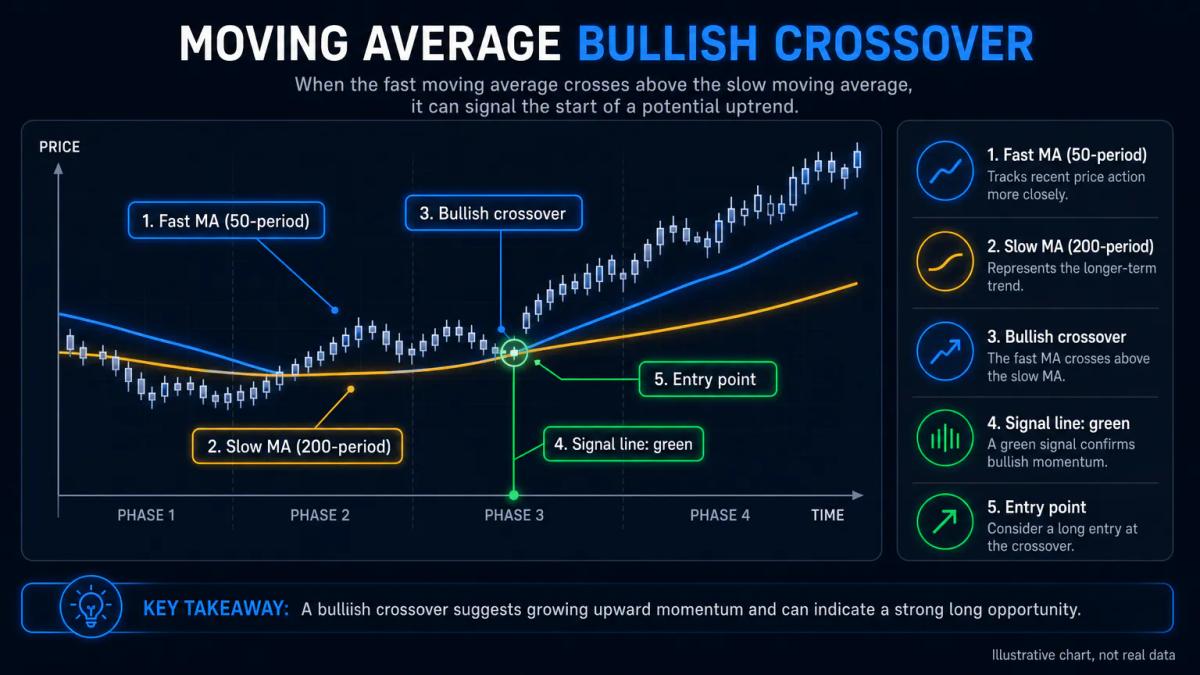
Consider a practical custom indicator that calculates two moving averages, stores each in its own buffer, and plots them as separate lines. Should the fast MA cross above the slow MA, the signal line could be coloured green, and red on the opposite cross. This kind of exercise teaches buffer management, drawing styles, and how to embed logic a trader might otherwise put in an Expert Advisor.
In MQL5, the skeleton would look like this:
#property indicator_chart_window
#property indicator_buffers 3
#property indicator_plots 3
double FastBuf[], SlowBuf[], SignalBuf[];
int fastHandle, slowHandle;
input int FastPeriod = 20;
input int SlowPeriod = 50;
int OnInit() {
SetIndexBuffer(0, FastBuf, INDICATOR_DATA);
SetIndexBuffer(1, SlowBuf, INDICATOR_DATA);
SetIndexBuffer(2, SignalBuf, INDICATOR_DATA);
PlotIndexSetInteger(0, PLOT_LINE_COLOR, clrDodgerBlue);
PlotIndexSetInteger(1, PLOT_LINE_COLOR, clrOrange);
PlotIndexSetInteger(2, PLOT_LINE_WIDTH, 2);
fastHandle = iMA(_Symbol, _Period, FastPeriod, 0, MODE_SMA, PRICE_CLOSE);
slowHandle = iMA(_Symbol, _Period, SlowPeriod, 0, MODE_SMA, PRICE_CLOSE);
IndicatorSetString(INDICATOR_SHORTNAME, "MA Cross");
return(INIT_SUCCEEDED);
}
int OnCalculate(const int rates_total, const int prev_calculated, /*...*/) {
int toCopy = rates_total - prev_calculated + 1;
if(CopyBuffer(fastHandle, 0, 0, toCopy, FastBuf) <= 0) return 0;
if(CopyBuffer(slowHandle, 0, 0, toCopy, SlowBuf) <= 0) return 0;
int start = prev_calculated > 1 ? prev_calculated - 1 : 1;
for(int i = start; i < rates_total; i++) {
if(FastBuf[i] > SlowBuf[i] && FastBuf[i-1] <= SlowBuf[i-1])
SignalBuf[i] = SlowBuf[i];
else if(FastBuf[i] < SlowBuf[i] && FastBuf[i-1] >= SlowBuf[i-1])
SignalBuf[i] = SlowBuf[i];
else SignalBuf[i] = EMPTY_VALUE;
}
return rates_total;
}
The MQL4 port replaces the handle plus CopyBuffer pair with direct iMA(NULL, 0, FastPeriod, 0, MODE_SMA, PRICE_CLOSE, i) calls inside the loop, flips the loop to walk from Bars - IndicatorCounted() - 1 down to zero, and swaps PlotIndexSetInteger for SetIndexStyle. The logic is the same even if the plumbing is different, which is a useful reminder that maintaining both versions doubles your test surface.
To see these conditions applied by a regulated broker, read our Tradu review.
Frequently Asked Questions
What is the difference between .mq4/.mq5 source files and .ex4/.ex5 compiled files?
The `.mq4` and `.mq5` files are human-readable source code you edit in MetaEditor. The `.ex4` and `.ex5` files are the compiled binaries MetaTrader actually executes. Distributing only the compiled file protects the source; the buyer cannot read or modify the logic without decompilation, and MetaTrader runs the `.ex` regardless of whether the `.mq` is present.
Can I use a custom indicator written in MQL4 on MetaTrader 5?
No. MQL4 compiles to `.ex4` and runs only on MetaTrader 4; MQL5 compiles to `.ex5` and runs only on MetaTrader 5. Porting requires source-level rewrites: buffer indexing direction, property setters, handle-based access to other indicators via `CopyBuffer`, and, for anything reading trades, the shift from an order-centric to a position-centric model.
How do I call a custom indicator from an Expert Advisor using iCustom?
In MQL4, `double v = iCustom(NULL, 0, "MyInd", param1, param2, bufferIndex, shift)` returns the value directly. In MQL5, call `int h = iCustom(_Symbol, _Period, "MyInd", param1, param2)` inside `OnInit`, store the handle, and read values with `CopyBuffer(h, bufferIndex, shift, 1, dest)`. Parameters must appear in the same order as the indicator's `input` declarations.
Why is my custom indicator showing no values or garbage data on the chart?
The three usual causes: buffers declared but not registered with `SetIndexBuffer`, a mismatch between `#property indicator_buffers` and the actual number of registered buffers, or an `OnCalculate` loop that never writes to the current bar. Initialize buffers to `EMPTY_VALUE`, print `rates_total` and `prev_calculated`, and confirm every plot has both a data buffer and a `PlotIndexSetInteger` call in MQL5.
Can I sell or distribute a custom indicator I've written?
Yes. You can share `.ex4` and `.ex5` compiled files directly, list the indicator on the MQL5 Market where MetaQuotes handles payment and copy protection, or distribute privately with account-number-locked builds embedded in the source. Selling the raw `.mq4` or `.mq5` file transfers the logic; selling only the compiled binary preserves it.
About the authors


Put this into practice
Related articles

Earnings Call Transcripts: How to Use Them for Trading Decisions
A practical guide to earnings call transcripts: where to find them, how to read prepared remarks and Q&A, and how to turn language shifts into trading signals.

Forex Swing Trading Signals: How to Read, Evaluate and Use Them
A practical editorial guide to forex swing trading signals: anatomy, indicators, risk sizing, provider evaluation, and the mistakes that quietly destroy accounts.

Futures Trading Signals: How to Read and Act on Them
A practical guide to futures trading signals: delivery channels, algorithmic logic, free trials, backtesting, and position sizing tied to signal confidence.
0 comments