



How to Trade · Advanced · 6 min read
How to Choose a VPS for Trading: Latency, Specs, and Setup
What makes a VPS suitable for trading
A trading VPS is a remote virtual server that runs your platform and Expert Advisors around the clock, independent of your home connection, power supply or operating-system updates. For a retail trader, three variables decide whether a VPS is fit for purpose:
- Round-trip latency to your broker's matching engine.
- Sustained compute headroom for your platform, plus any attached EAs or indicators.
- Documented uptime backed by a service-level agreement.
The case for offloading execution becomes clearest when you run automation. Consider a strategy that depends on tick-by-tick processing: a residential connection introduces jitter and occasional packet loss that distort fills, trigger requotes, and leave orphan positions when the router restarts. A VPS collocated near your broker removes those variables, allowing you to reason about slippage as a function of market microstructure rather than of the Wi-Fi link in your flat.
There is also an operational dimension to consider. Should you disconnect your laptop, reboot it, travel, or lose power at home, your positions keep being managed by the server, and that reshapes how you size risk. Trailing stops, break-even logic and news filters inside an EA continue to run as written when your PC sleeps. The best VPS for forex robots is one that behaves identically on day 1 and on day 300, with no silent degradation over time.
Putting this into practice means opening an account: start with the best forex brokers our team reviewed.
CPU, RAM, and storage: sizing your VPS
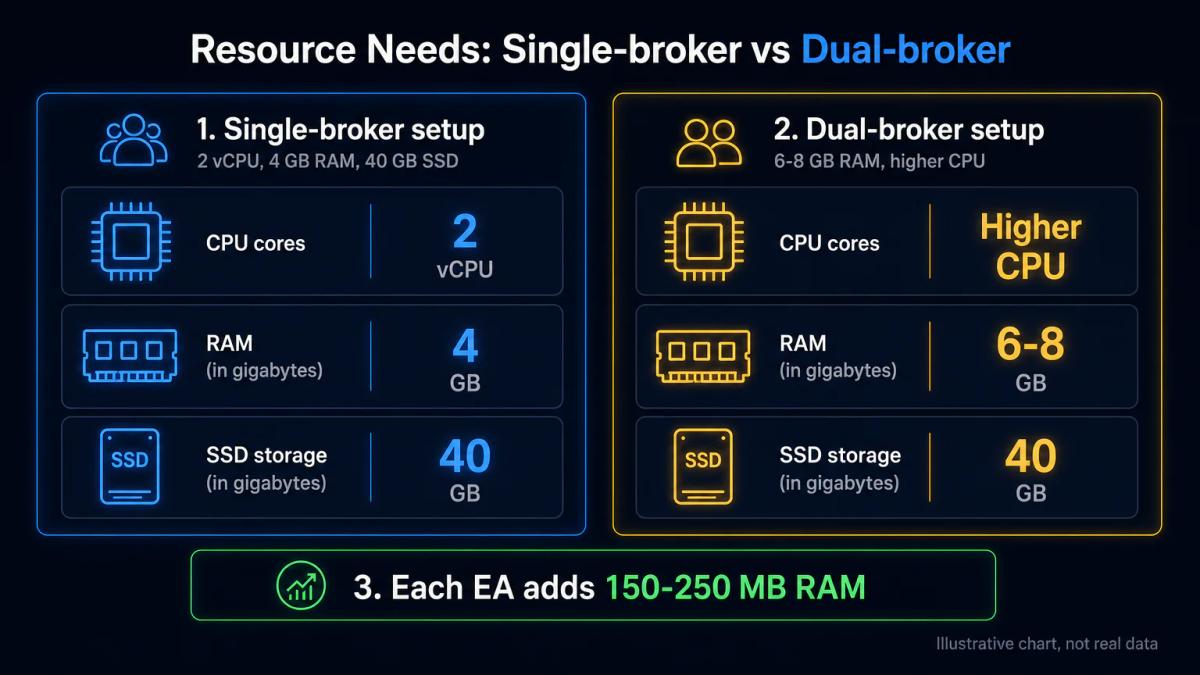
For an MT4 or MT5 terminal with up to five charts and two or three EAs, a sensible floor is 2 vCPU, 4 GB of RAM and a 40 GB NVMe SSD. Each additional MetaTrader instance adds roughly 150-250 MB of RAM at idle, and more under heavy tick load, so a dual-broker setup already justifies 6-8 GB.
Scalping EAs, grid systems that keep hundreds of pending orders open, and tick-replay backtesting are all CPU-bound, so you should prioritise clock speed over core count and ask the provider which generation of Xeon or EPYC underpins the plan. Storage has a smaller impact for live trading than for history and logs, so budget 1-2 GB per month per terminal if you keep tick history for audit.
Monitor memory and CPU for the first two weeks, and only scale up if you see sustained CPU above 70% or RAM pressure causing swap. Paying for capacity you never use is a recurring and avoidable cost that quietly erodes your edge.
Latency, location, and broker proximity
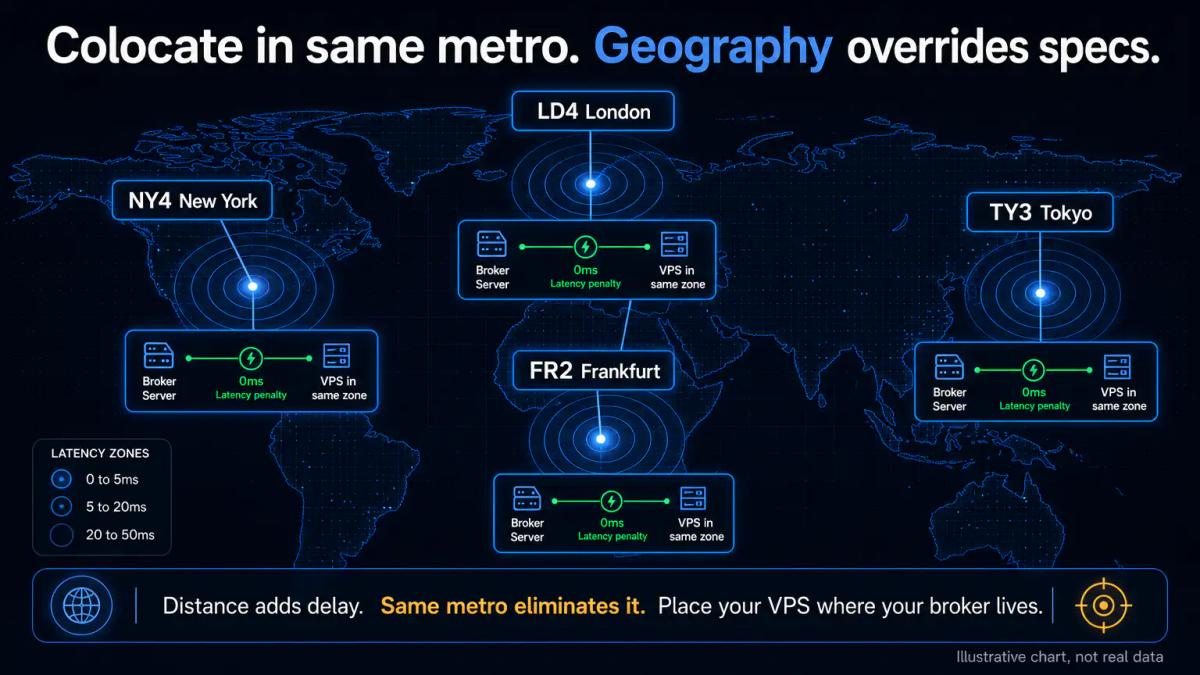
Latency is the single parameter where geography overrides specs, since a fast CPU in Frankfurt will be of no help if your broker's price server sits in Equinix NY4 and the route adds 80 ms each way.
Before buying, identify where your broker hosts its MT4/MT5 bridge. Common hubs include:
- LD4 (London)
- NY4 (Secaucus)
- TY3 (Tokyo)
- FR2 (Frankfurt)
A low-latency VPS trading setup colocates in the same metro, ideally the same data centre, which typically yields a round trip under 5 ms. Confirm the broker's data-centre with their support team directly, rather than relying on marketing copy. When vetting providers, work through the following checks:
- Ask the VPS provider for the specific facility, including the exact data-centre name, rather than just the city.
- Run a ping test from the trial VPS to your broker's trade server (ping and tracert inside the terminal).
- Check latency during London and New York session opens, when the network is under real load, rather than during quiet weekend hours.
- Compare median and 99th-percentile latency; spikes are what cause requotes.
If your broker uses multiple servers (demo, live, archive), measure to the live one you actually trade on.
Uptime guarantees and reliability
Treat the SLA as a contract that will be enforced, not as a marketing slogan. A 99.5% uptime guarantee allows for roughly 3.6 hours of downtime per month; 99.9% allows 43 minutes; 99.99% allows only 4 minutes. Those gaps separate an EA that runs smoothly through NFP from one that disconnects at the worst possible moment.
Read the compensation clause carefully, because most providers refund pro-rata credit against the monthly fee, which will never cover the trading loss caused by the outage itself. Verify redundancy at the infrastructure level too: dual power feeds, N+1 cooling, redundant upstream carriers, and automatic failover between hypervisor nodes.
Ask whether backups are snapshot-based, how often they run, and how long restoration takes. A VPS that recovers in 30 minutes with yesterday's state will serve you better than one that promises 99.99% and then takes six hours to come back after a hardware failure.
Cost, billing, and hidden fees
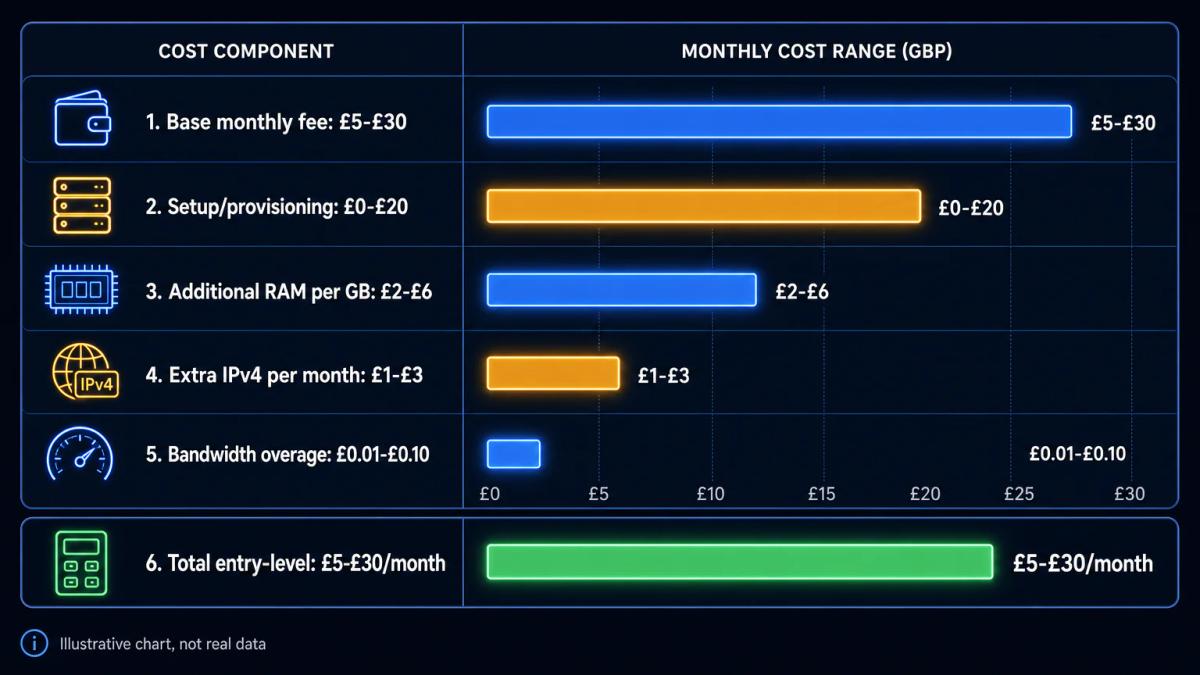
Entry trading VPS plans range from roughly £5 to £30 per month, with professional low-latency tiers sitting in the £50-£150 range. Keep in mind that the headline price is only one line item among several that make up what you actually pay each month.
| Cost component | What to check | Typical range |
|---|---|---|
| Base monthly fee | Introductory vs renewal rate | £5-£30 |
| Setup / provisioning | One-off or waived | £0-£20 |
| Additional RAM | Per GB per month | £2-£6 |
| Extra IPv4 address | Per IP per month | £1-£3 |
| Bandwidth overage | Per GB above cap | £0.01-£0.10 |
| Managed support | OS patching, platform install | £5-£20 |
| Data-centre relocation | Per move | £0-£25 |
Annual billing usually unlocks a 15-25% discount, though it also locks you in before you have had the chance to verify latency. A two-week paid trial on monthly billing, combined with a documented refund policy, is the lower-risk entry route. Confirm the renewal price before paying, since the second-year rate is where most providers quietly recover the discount they gave you up front.
Security and data protection
Your VPS holds live broker credentials, API keys, and sometimes the source code of proprietary EAs, so you should treat it as a production server rather than as a convenience box. The following practices form a reasonable baseline:
- Change the default Administrator or root password on first login and disable password auth in favour of key-based SSH where the OS allows it.
- Restrict RDP or SSH to a whitelist of your own IPs, or front it with a VPN before exposing it to the public internet.
- Keep the OS patched; schedule reboots outside trading hours.
- Store MT4/MT5 passwords in the terminal's own encrypted profile, keeping them out of any plain-text notes left on the desktop.
- Enable the host-level firewall and close every port you do not use.
- Verify the provider offers DDoS mitigation at the network edge, extending beyond the application layer alone.
Ask the provider in writing whether backups are encrypted at rest, where they are stored, and who in their organisation can access the hypervisor console. A provider that cannot answer those questions clearly is likely unready to host your trading stack.
Broker compatibility and pre-installed platforms
Several brokers offer a VPS as a hosted service, either free above a monthly volume threshold or at a flat fee, with MT4, MT5 or cTrader pre-installed and tuned for their trade servers. The advantage lies in deterministic latency inside the broker's own network, together with one less vendor to manage over time.
The trade-off is portability, since a broker-hosted VPS usually locks you to that broker's terminals and server endpoints, and migrating to another broker means rebuilding the environment from scratch. If you run strategies across two or three brokers, an independent VPS in the same data centre offers more flexibility. Confirm the OS (Windows Server 2019 or 2022 is standard for MetaTrader) and check that the provider will not throttle CPU under neighbour load, which silently degrades EA performance on oversold shared hosts.
To see these conditions applied by a regulated broker, read our Eightcap review.
Frequently Asked Questions
Do you need a VPS if you trade part-time from home?
If you only trade discretionary setups while sitting at the screen, a stable home connection is enough. A VPS becomes necessary when positions must be managed while you are away, when EAs run overnight, or when your home line has frequent micro-outages that disconnect the terminal mid-trade.
What is the difference between a trading VPS and a standard web hosting VPS?
A trading VPS is tuned for low-latency outbound connections to broker trade servers and typically runs Windows Server with MetaTrader support, located near financial data centres like LD4 or NY4. A standard web hosting VPS is optimised for inbound HTTP traffic and may sit in a region with poor routing to your broker.
Can you run multiple trading platforms on the same VPS?
A 2 vCPU / 4 GB VPS comfortably runs two MT4/MT5 instances; add roughly 1-2 GB of RAM per additional terminal under load. Use separate Windows user profiles or portable installations to keep configurations isolated and avoid updater conflicts.
How do you know if VPS latency is good enough for your broker?
Ping the broker's live trade server from inside the VPS during active sessions. For most retail execution, sub-20 ms median with 99th-percentile below 50 ms is adequate, while scalping EAs and news strategies tend to want sub-5 ms. Measure during the London and New York opens, when liquidity and routing are under real load, rather than during quiet weekend hours.
What happens if the VPS provider goes down; will your positions close?
Open positions sit at the broker rather than on the VPS, so they remain live even when the server is unreachable. Pending orders, trailing stops and EA-managed exits that rely on terminal connectivity will stop updating until the server returns. Server-side stop losses and take profits placed directly at the broker form the fallback that keeps risk bounded during an outage.
About the authors


Put this into practice
Related articles

How to Day Trade for a Living: A Realistic Roadmap
A practical roadmap to day trading for a living: capital, rules, risk limits, broker selection, tax reporting and the daily routine that separates survival from a blown account.

How to Find Stocks to Day Trade: A Practical Screening Approach
A practical, beginner-friendly framework for screening day trading stocks by volume, volatility, chart patterns, sector strength, and broker tools.
How to Start Trading for Beginners: A Step-by-Step Guide
Learn how to start trading for beginners with this easy guide. Covers account setup, your first trade, risk management, and the key factors that move markets.
0 comments