



How to Trade · Beginner · 8 min read
Best Trading Platform for Beginners: Features, Costs and Safety
What makes a trading platform work for beginners
Choosing where to open your first account comes down to a handful of practical qualities working together: low or zero commissions on stocks and ETFs, a clean interface you can navigate in your first session, built-in educational material, and authorisation from a recognised regulator. You should be able to open an account with a modest deposit, place a trade from either web or mobile, and practise on a demo account before any real money is at risk.
The shortlist above is deliberately narrow, since a beginner has little use for twenty order types, algorithmic routing or a Level II order book. What you actually use in those first weeks is simpler: finding the buy button, seeing your balance, placing a stop loss (an instruction that closes a losing trade at a preset price), and knowing who to call when something breaks. Everything beyond that can wait until your routine has settled into a predictable rhythm.
Putting this into practice means opening an account: start with the best forex brokers our team reviewed.
Commission-free trading and account minimums
Most beginner-friendly platforms charge zero commission on stocks and ETFs listed on their home exchange, which removes the per-trade fee that used to penalise small accounts. The cost structure has instead shifted into the spread (the gap between the buy and sell price) and into currency conversion when you trade a share listed abroad, so the headline label of commission-free can still conceal a meaningful bill. On a $500 purchase of a US stock from a sterling account, a 0.5% FX fee comes to $2.50, which is actually higher than the old flat commission charged at some venues.
Account minimums vary widely, with some platforms opening with no minimum or a token £1, others asking for £100 to £500 before the full feature set unlocks, and a few professional-tier accounts sitting at £1,000 or above. For a reliable picture of the real cost, look through the full fee page rather than relying on the headline figure the broker advertises.
Interface design and ease of navigation
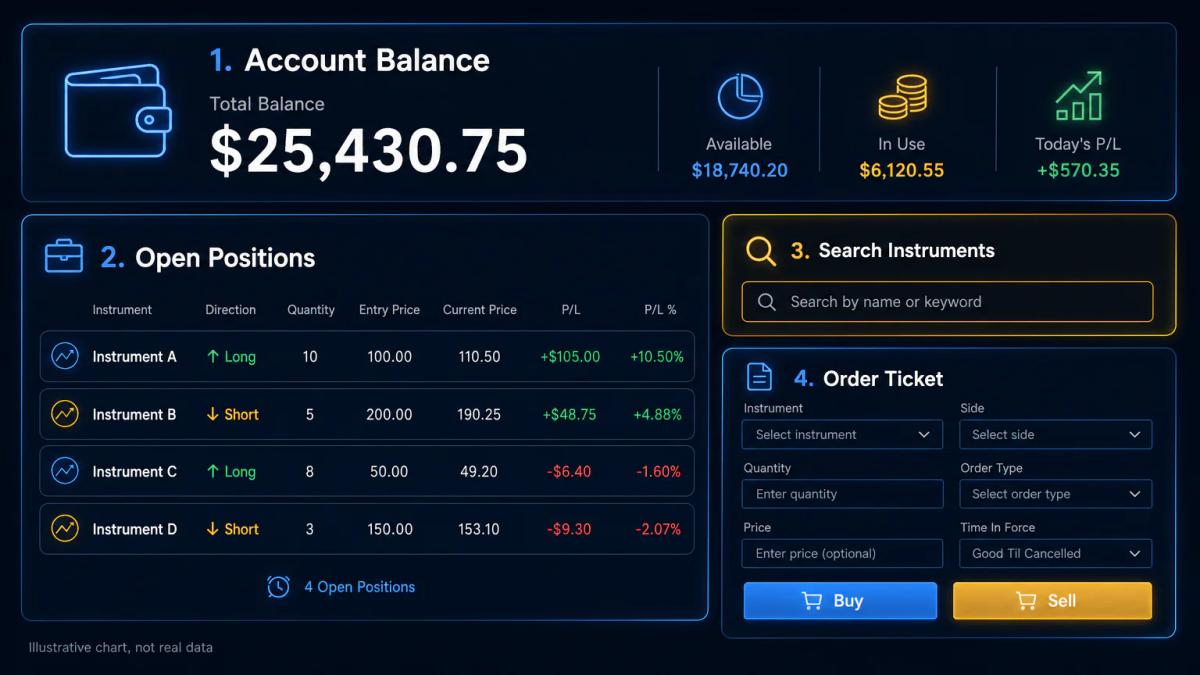
A good interface for a new trader puts four things one click away:
- your balance
- your open positions
- the search box for an instrument
- the order ticket
Menus should be labelled in plain English, with acronyms avoided, and the default order ticket should open with a safe quantity. A good test of a platform's clarity is whether you can locate and close an open position within two minutes of signing in to the demo; if that search takes any longer, the platform is probably still too much for where you are.
The mobile app should mirror the web platform's core actions, since switching between a laptop at home and a phone on the train is part of the ordinary trading week. Having to relearn the layout each time you change device is where small input errors tend to creep in. Look for a single watchlist that syncs across devices and a biometric login that spares you from retyping a password every session.
Educational resources and learning tools
Platforms aimed at beginners typically bundle video tutorials, webinars, written guides and a glossary either inside the platform or on the broker's main site. The most helpful versions are structured as a sequence you work through in order:
- Open an account.
- Place a demo trade.
- Read about position sizing.
- Place a second demo trade with a stop loss attached.
Less useful material tends to arrive as a scattered library of articles with no obvious order to work through, which leaves you choosing where to start every time you sit down to learn.
Paper trading, also called a demo account, lets you place trades with virtual money against live prices. Use it for at least two to four weeks before funding a real account, and treat it seriously: record every trade, write down the reason you entered, and review the losers afterwards. Backtesting, where you run a rule on past prices to see how it would have performed, becomes useful once you have a specific rule to test, though before that it mostly absorbs time without producing anything you can act on. Both tools exist for the same reason, which is to help you tell a working idea apart from a lucky one before any capital is at stake.
Regulatory status and broker safety
The regulator is the first thing to confirm, well before you weigh any other feature. In the UK the Financial Conduct Authority (FCA) authorises retail brokers and publishes each firm's reference number on its register; in Australia the Australian Securities and Investments Commission (ASIC) does the equivalent; in the United States equity brokers are overseen by FINRA and the SEC. Regulated brokers hold client money in segregated accounts, submit to audits, and in several jurisdictions are covered by a compensation scheme if the firm fails.
For UK retail clients the FCA caps leverage (borrowed exposure expressed as a multiple of your deposit) at the following levels:
- 1:30 on major currency pairs
- 1:20 on major indices
- 1:5 on individual equities
- CFDs on cryptocurrencies, which are prohibited for retail entirely
An offshore licence sits outside this framework and should be considered a different product, with different protections and different leverage on offer.
Which features count most when you are starting out
When you are starting out, a short and focused checklist tends to be more useful than any sprawling feature comparison. The features that shape your first six months, with everything else free to wait, are the following:
- the deposit minimum
- the all-in cost of a round-trip trade
- the quality of the mobile app
- the presence of a demo account
- the response time of customer support when you cannot log in on a Monday morning
Support channels differ sharply between platforms, and the differences only show up when something goes wrong. The practical questions to ask before you deposit are:
- Is live chat available 24/5 during market hours, or only in office hours?
- Is there a phone number for a human, or only a ticket form?
- What is the typical first-response time on email: minutes, hours or the next working day?
- Is support in your language from a local team, or routed to a shared desk?
Suppose you place a market order on a Tuesday morning and the app freezes before you see a confirmation. If the only channel is email with a next-day response, you may spend the session unsure whether you own the position. A platform with live chat answering inside five minutes is worth a slightly higher spread for a beginner.
Risk management tools and position sizing for new traders
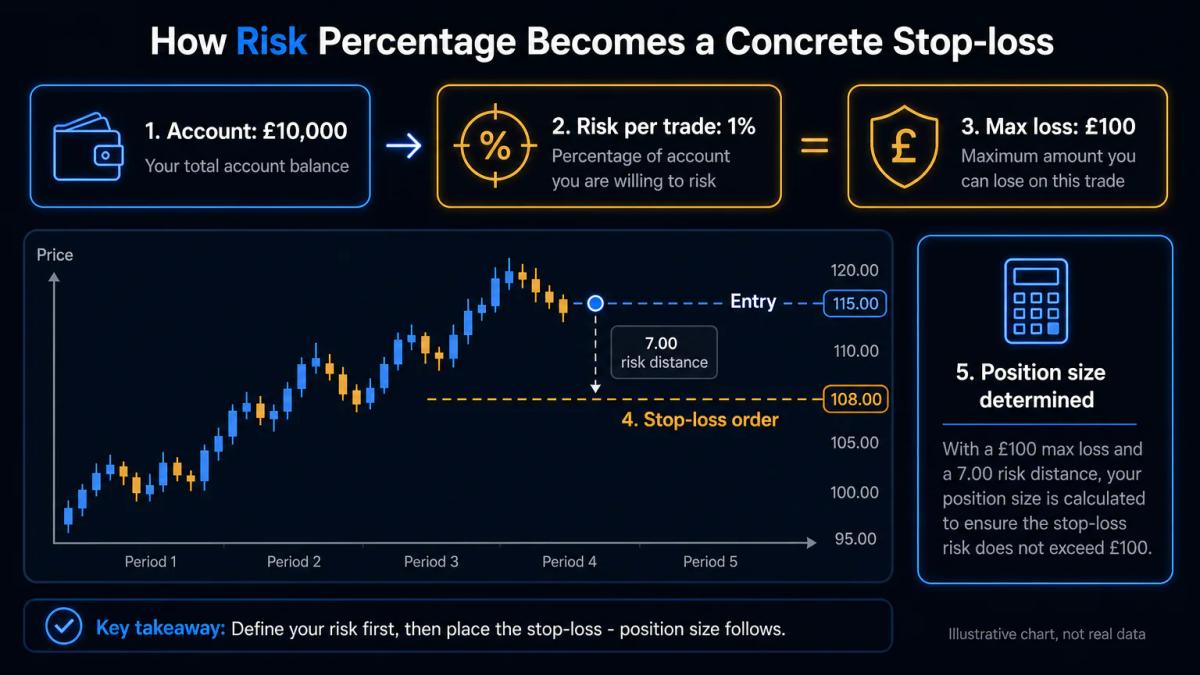
A beginner platform should offer a stop-loss order, a take-profit order (an instruction that closes a winning trade at a preset price), and a position sizing calculator or an input field that shows the cash risk of the order before you confirm it. The point of these tools is to turn risk from an abstraction into a number you decide in advance.
A simple rule to start with is to risk no more than 1% of the account on a single trade, and the arithmetic is straightforward.
Imagine an account of £2,000. One percent is £20. If you buy a share at £50 and set a stop loss at £48, your risk per share is £2, which means a position size of 10 shares (£20 divided by £2). The order ticket should show that £20 figure before you confirm.
Platform design shapes trader behaviour in subtle ways. A one-click order ticket that leaves the stop loss optional tends to encourage oversized positions, since the fastest path through the screen skips the moment where you would stop and size the trade. A ticket that forces you to type a stop or confirm its absence introduces a small pause at exactly the point where that pause is most useful. Watchlists and price alerts play a similar role, letting you wait for a planned setup instead of chasing a chart that is already moving.
Comparing platforms by region and regulatory jurisdiction
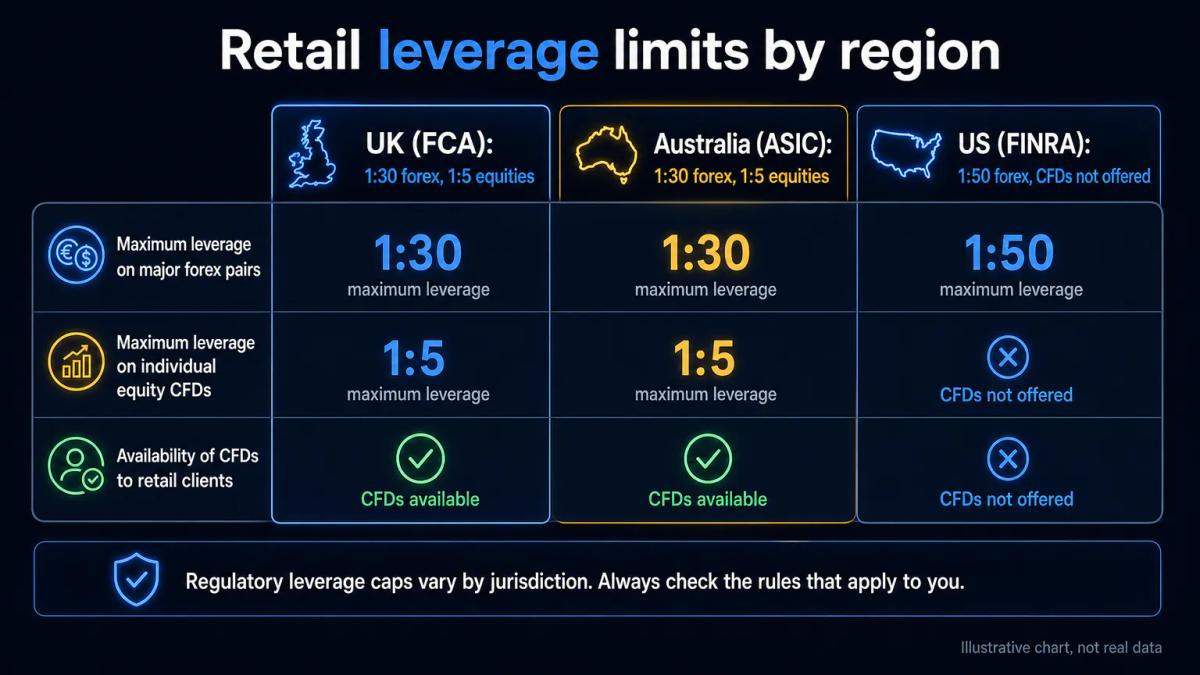
Your choice of platform depends on where you live and which regulator oversees it, because leverage caps, account types and asset availability change at the border. The table below sets out the main differences for retail clients.
| Feature | UK (FCA) | Australia (ASIC) | United States (FINRA/SEC) |
|---|---|---|---|
| Max leverage on major FX | 1:30 | 1:30 | 1:50 |
| Max leverage on individual equities (CFD) | 1:5 | 1:5 | CFDs not offered to retail |
| CFDs on crypto for retail | Prohibited | Restricted | Not offered |
| Tax-advantaged account | Stocks and Shares ISA, SIPP | Superannuation (via fund) | IRA, Roth IRA, 401(k) via employer |
| Client money protection | Segregated, FSCS up to £85,000 | Segregated, no equivalent of FSCS | SIPC up to $500,000 (cash sublimit $250,000) |
| Third-party platform access | MT4, MT5, cTrader, TradingView common | MT4, MT5, cTrader, TradingView common | TradingView common, MT4/MT5 less so |
Tax-advantaged wrappers are worth checking at the account-opening stage. A UK beginner buying UK and US shares inside a Stocks and Shares ISA shelters gains and dividends from UK tax up to the annual subscription limit set by HMRC; a US beginner using an IRA defers tax on gains until withdrawal. Broker coverage of these wrappers varies, and moving to one later requires a full account transfer with your existing holdings.
Integration with third-party tools is the last axis. MetaTrader 4 and 5 (MT4, MT5) and cTrader are standard for FX and CFDs across FCA and ASIC brokers; TradingView, a browser-based charting tool, connects to a growing list of brokers for order routing. If you expect to run charts on TradingView and execute on the broker, confirm that specific link exists before you deposit, because adding it later is not always possible.
To see these conditions applied by a regulated broker, read our StoneX Trading review.
Trading platforms worth shortlisting as a beginner
No single platform fits every new trader, but a handful come up repeatedly on beginner shortlists because they combine a recognised regulator, a usable interface and a workable demo. Treat the names below as a starting point for your own comparison rather than a ranking, and always confirm the current fee schedule and regulatory status on the broker's own site before you deposit.
- eToro: FCA, ASIC and CySEC authorised, with a simple web and mobile interface and a copy-trading feature that lets you mirror other users' positions. Commission-free on stocks, with FX conversion and a withdrawal fee to factor in.
- Trading 212: FCA authorised, no account minimum, commission-free stocks and ETFs, and a demo account that mirrors the live platform tick for tick.
- Interactive Brokers: regulated across the UK, US, EU and Australia, with the broadest market coverage of any mainstream broker. The IBKR Lite tier removes US stock commissions and the mobile app is lighter than the desktop workstation.
- IG: FCA authorised, long-established, with a polished web platform, a demo account and integrations with MT4 and ProRealTime for charting.
- Saxo: regulated in multiple jurisdictions including the FCA and the Danish FSA, with access to a wide range of global markets and a tiered pricing structure that rewards larger accounts.
Frequently Asked Questions
Can I start trading with a small amount of money on a beginner platform?
Yes. Several FCA-authorised platforms open accounts with no minimum or a token deposit from £1 to £100, and fractional shares let you buy part of a share priced above your budget. The constraint is not the minimum, it is cost efficiency: a $2.50 FX fee on a $50 trade is a 5% drag before the market moves.
What is the difference between a web platform and a mobile app for trading?
The web platform runs in your browser and typically offers larger charts, more order types and the full account history. The mobile app is a cut-down version focused on placing and managing trades, viewing positions and receiving alerts. On a well-designed platform the account and watchlist sync between the two, so you can start a plan on the laptop and execute on the phone.
How do I know if a trading platform is regulated and safe?
Find the firm's reference number on the broker's site and search it on the regulator's public register: the FCA Register in the UK, ASIC Connect in Australia, BrokerCheck for FINRA in the United States. Confirm the entity named on your account agreement matches the authorised entity, and check which compensation scheme, if any, covers your deposit if the firm fails.
Should I use paper trading before risking real money?
Yes. Spend two to four weeks placing trades on a demo account with the position sizes you intend to use for real, keep a log of each trade and its rationale, and only fund the live account when your process is stable. Paper trading does not reproduce the emotional pressure of real money, so expect your early live results to be worse than your demo ones.
What customer support options should a beginner platform offer?
At a minimum: live chat during market hours, a phone number staffed by humans, and email with a published response time. Test the chat before you deposit by asking a specific question about fees; a vague or scripted reply is a signal, as is a wait longer than ten minutes. Local-language support from a team in your jurisdiction is a meaningful upgrade over a shared offshore desk.
About the authors


Put this into practice
Brokers we have reviewed
Scored on the same five dimensions. Here are three of them — the full list is on the brokers page.



Related articles

Can You Day Trade Futures? Rules, Margin, and Requirements
A practical guide to day trading futures for retail traders: margin, PDT exemption, 24-hour access, Section 1256 tax treatment, and how to start with micro contracts.

Cryptocurrency Trading Guide for Beginners: How to Start
A plain-English cryptocurrency trading guide for beginners covering strategies, risk management, platform choice, UK regulation, tax reporting and asset security.

Custom Indicator (MQL4, MQL5): Structure, Setup, and Code
A working guide to coding, installing, debugging and optimizing custom indicators in MQL4 and MQL5, including a moving average crossover walkthrough.
0 comments