



Trading Basics · Beginner · 6 min read
Alternatives to TradingView: Charting Platforms Compared for Retail Traders
Why traders look beyond TradingView
Retail traders arrive at this question from very different setups, and TradingView's chart-first design fits some of them better than others. If you rely on company financials, want to place orders inside the same window as your analysis, or need automated strategies without writing much code, the platform you already use might be adding steps to your day rather than removing them. The alternatives worth knowing about tend to solve one of these gaps well:
- Native order routing from the chart, without switching windows to reach the broker.
- Automated strategies built with visual tools or a language other than Pine Script.
- Fundamental and macro data on equities, ETFs and economies.
- A lower monthly cost, or a free option covered by a broker account.
Friction with the free tier is the other reason traders start looking around. Indicators per chart are capped, intraday historical data is throttled on lower timeframes, and placing an order still means jumping from the chart into the broker's own window. A beginner barely notices any of it, but for an active trader running several setups a day those extra clicks and reloads add up across a session. The comparison below covers the four platforms most retail traders actually consider when they weigh alternatives: MT4, MT5, cTrader and Koyfin.
Where you trade shapes your results almost as much as your strategy does, so it is worth comparing the best forex brokers and the conditions they offer.
Feature comparison: what each platform does well
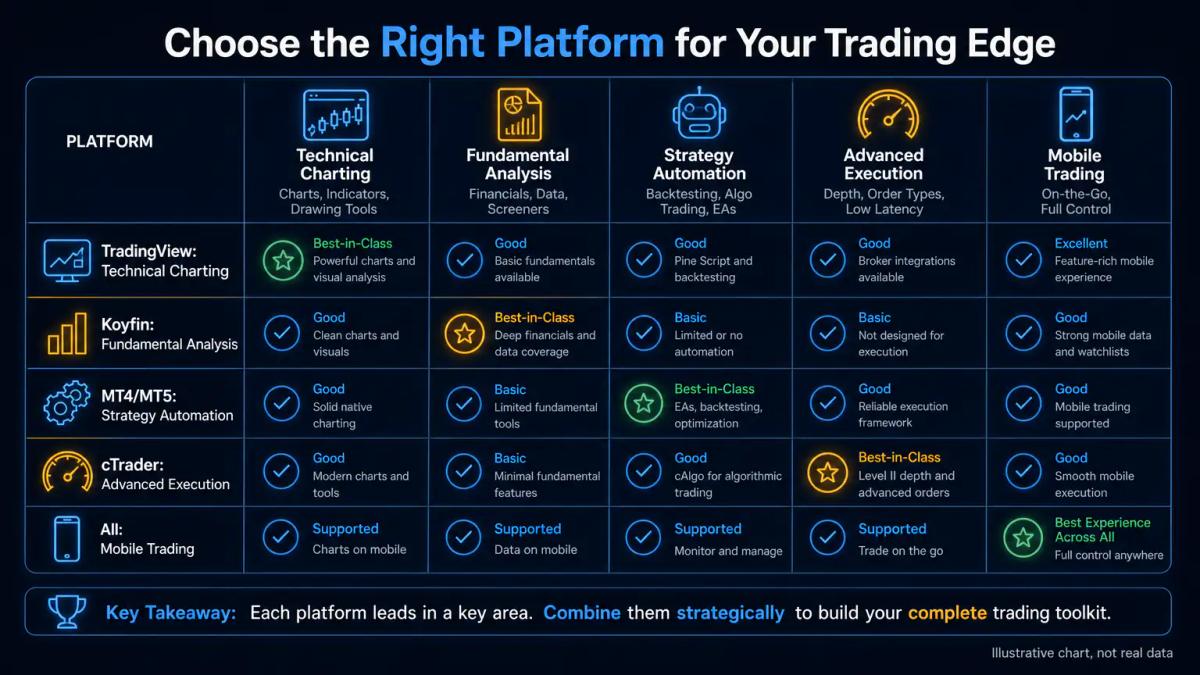
TradingView leads on technical charting and indicator customisation through Pine Script, the platform's scripting language for building indicators and strategies. The main alternatives split the workload differently. Koyfin specialises in fundamental analysis, covering equities, macro data and company financials that TradingView treats as secondary. MetaTrader 4 (MT4) and MetaTrader 5 (MT5), built by MetaQuotes, are broker-native platforms bundling charts with direct execution. cTrader, developed by Spotware, does the same job with a cleaner order-management layer and native depth-of-market data (the live queue of buy and sell orders at each price level).
The table below summarises the core strengths of each option for a retail trader choosing a primary workstation.
| Platform | Core strength | Asset focus | Scripting language |
|---|---|---|---|
| TradingView | Charting, community scripts | Multi-asset, crypto-friendly | Pine Script |
| MT4 | Forex charting and Expert Advisors | Forex and CFDs | MQL4 |
| MT5 | Multi-asset with depth of market | Forex, CFDs, equities, futures | MQL5 |
| cTrader | Order execution and level-2 pricing | Forex and CFDs | cAlgo (C#) |
| Koyfin | Fundamental and macro data | Equities, ETFs, macro | None (dashboards) |
Switching platforms carries a real learning cost that the summary hides. A Pine Script user moving to MT5 has to relearn syntax in MQL5 before any of their old strategies can run. A Koyfin subscriber, meanwhile, loses the charting depth they had on TradingView and gains balance sheets, earnings estimates and macro screens that TradingView does not carry natively.
Pricing and subscription models
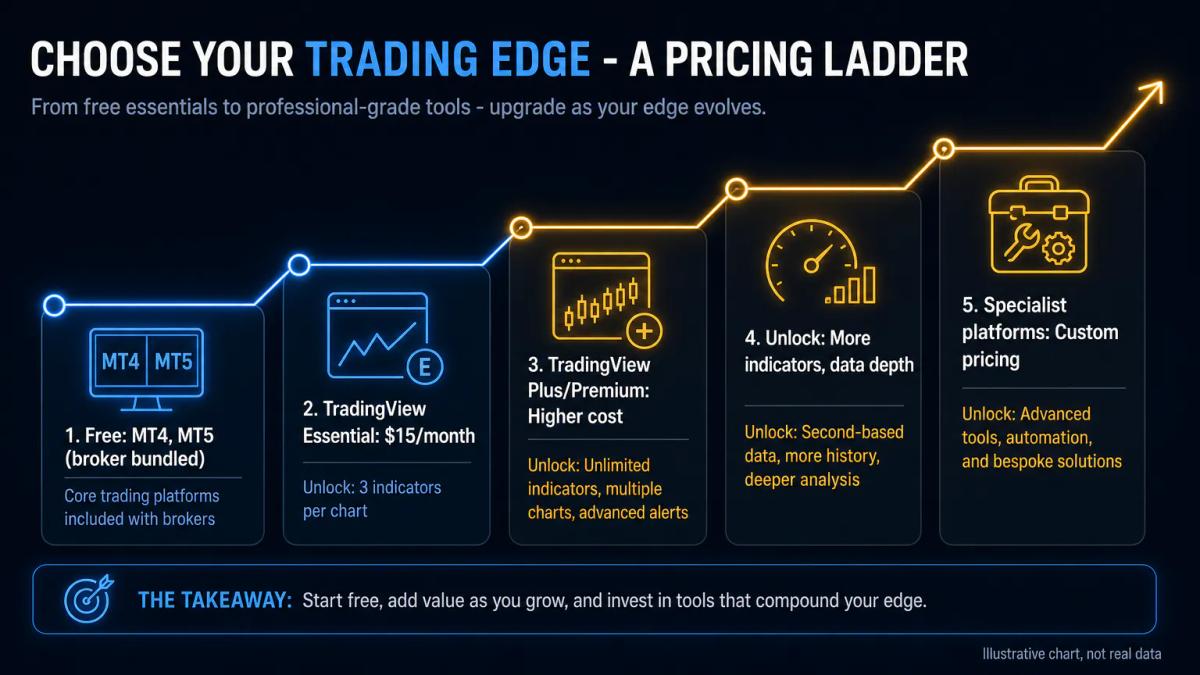
TradingView's free tier is generous but limited: three indicators per chart, ads, and reduced historical depth on intraday timeframes. Paid plans start around $15 per month for the Essential tier and climb for Plus, Premium and Expert, with higher tiers unlocking more indicators, second-based charts and priority data feeds. TradingView sets prices and reviews them periodically.
MT4 and MT5 are the main free alternatives: you download them from your broker at no cost, and the broker covers the data feed as part of the trading account. cTrader follows the same model. Koyfin offers a free tier with delayed data and paid plans starting in the mid-teens per month, with higher tiers for real-time equity data.
If cost is the deciding factor and you already have a broker account, MT4, MT5 or cTrader give you professional charting for zero subscription.
Backtesting and strategy automation
Backtesting means running a trading rule over historical price data to see how it would have performed. TradingView's Pine Script Strategy Tester is powerful for visual backtests but restricted to the bar data your subscription unlocks and to single-symbol tests on most tiers.
MT4 and MT5 include a native Strategy Tester for Expert Advisors, the MetaTrader name for automated trading robots written in MQL4 or MQL5. MT5 adds multi-symbol and multi-threaded testing, useful if your strategy trades a basket. cTrader provides cAlgo, a built-in environment where you can code strategies in C# or use visual tools to test without writing code.
A beginner who wants to test ideas without programming will find cTrader's visual builder and TradingView's bar replay the gentler entry points, while MT4 and MT5 remain the retail standard once you move into heavier automation.
Broker integration and live trading
TradingView connects to a growing list of brokers through its Trading Panel, though the platform itself does not hold your account: orders route out to the broker you have linked, and coverage depends on which brokers your regulator allows you to use. MT4, MT5 and cTrader take a different approach, since you open an account with a broker that offers the platform, log in with the credentials the broker issues, and every chart you see is already wired to a one-click order ticket.
UK retail traders should note that FCA-authorised brokers apply the same set of leverage caps whichever platform they run:
- 1:30 on major forex pairs.
- 1:20 on major indices.
- 1:5 on individual equities.
- Contracts for difference on cryptocurrency are prohibited for UK retail clients, regardless of the platform used.
The onboarding entity and its licence, not the software you install, decide what you can trade.
Mobile apps and on-the-go trading
TradingView's mobile app carries most of the charting features you use on desktop, but placing trades depends on the connected broker and the paid tier you hold. MT4 and MT5 mobile apps, available on iOS and Android, offer full trading: you can open, modify and close positions, set stop losses and take profits (orders that close a trade at a preset loss or gain), and manage pending orders from the chart.
cTrader Mobile matches that functionality and adds the same depth-of-market view you get on desktop, useful if you scale in and out of positions during the session. Koyfin's mobile experience is oriented to reading dashboards rather than trading.
Learning curve and beginner setup
TradingView is the easiest to open: you sign up on the web, load a chart and start drawing. The learning curve appears when you move to Pine Script or to strategy testing. MT4 and MT5 require you to open a broker account first, then install the platform and log in with server credentials, which is one extra step for a beginner.
cTrader has a cleaner interface than MetaTrader but exposes more order types out of the box, so plan time to read the documentation. Koyfin rewards users who already understand balance sheets and macro indicators; without that base, its dashboards feel dense.
How to choose the right platform for your workflow
The right choice depends on which part of the workflow you want the platform to own. Use the shortlist below as a starting point, and remember that many retail traders end up running two tools in parallel, one for analysis and one for execution:
- TradingView if you want the deepest charting and an active community of scripts and ideas.
- MT4 or MT5 if your broker offers them and you want to trade directly from the chart with Expert Advisors.
- Koyfin if fundamental analysis and macro screens drive your decisions.
- cTrader if you need advanced order types, depth of market and a modern execution layer.
For a concrete example of costs and platform, the GO Markets review goes through them line by line.
Frequently Asked Questions
Is TradingView the best charting platform for day traders?
TradingView is the strongest general-purpose charting platform for day traders thanks to Pine Script, a large indicator library and second-based charts on higher tiers. For traders who need one-click execution and depth of market on every ticket, cTrader or MT5 are often a better fit because they combine charting with a native order layer.
Can you execute trades directly from TradingView?
You can send orders from TradingView's Trading Panel if your broker is on the platform's connected list, but the account itself sits with the broker, not with TradingView. Coverage depends on which brokers your regulator authorises. MT4, MT5 and cTrader are broker-native, so trading from the chart is the default.
What is the cheapest alternative to TradingView for technical analysis?
MT4 and MT5 are the cheapest serious alternatives: you download them from a broker at no cost, and the data feed is included in the trading account. cTrader follows the same model. If you want to keep TradingView-style scripting without a subscription, MT4's MQL4 and MT5's MQL5 give you free coding environments and native backtesting.
Do MT4 and MT5 offer the same charting tools as TradingView?
MT4 and MT5 include standard indicators, drawing tools and custom indicator support through MQL, but the visual polish, screener and community-shared scripts are more limited than TradingView. Many retail traders keep TradingView open for analysis and MT4 or MT5 for execution, which is a workable and popular setup.
Which platform is best for backtesting trading strategies without coding?
cTrader offers a visual strategy builder inside cAlgo that lets you assemble entry and exit rules without writing code. TradingView provides bar replay and a Strategy Tester driven by Pine Script, which is more accessible than MQL but still requires some scripting. For pure point-and-click backtesting, cTrader is the closest to zero-code.
About the authors


Put this into practice
Related articles
Are Short-Term Investments Assets or Liabilities? A Plain-English Answer
A clear guide to how short-term investments sit on the balance sheet, why they count as current assets, and what that means for tax, treasury and real returns.
Day Trading Discussion Boards: How to Use Forums Without Losing Money
A practical guide to day trading discussion boards: how they work, what to gain from them, and the risks, regulatory rules and psychological traps to watch for.

ECN vs Market Maker Broker: What the Difference Actually Costs You
ECN vs market maker broker: understand the real cost difference, conflict of interest risks, and which model suits your trading style
0 comments