



CFD Trading · Intermediate · 3 min read
Best Automated Futures Trading Systems: What Actually Works
What automated futures trading systems do and why they earn their place
Retail traders reach for these systems when they want rules to run without their hands on the mouse. In practice, a system watches live price on futures contracts, checks it against your logic every tick, and fires entries and exits through an API (Application Programming Interface, the channel that lets software send orders to the exchange) whenever your conditions line up. Beyond removing emotion under pressure, futures algo trading gives a single trader the reach to cover several contracts or timeframes at once, which is difficult to do by hand at any speed.
Putting this into practice means opening an account: start with the best forex brokers our team reviewed.
How they are built and what separates good systems from poor ones
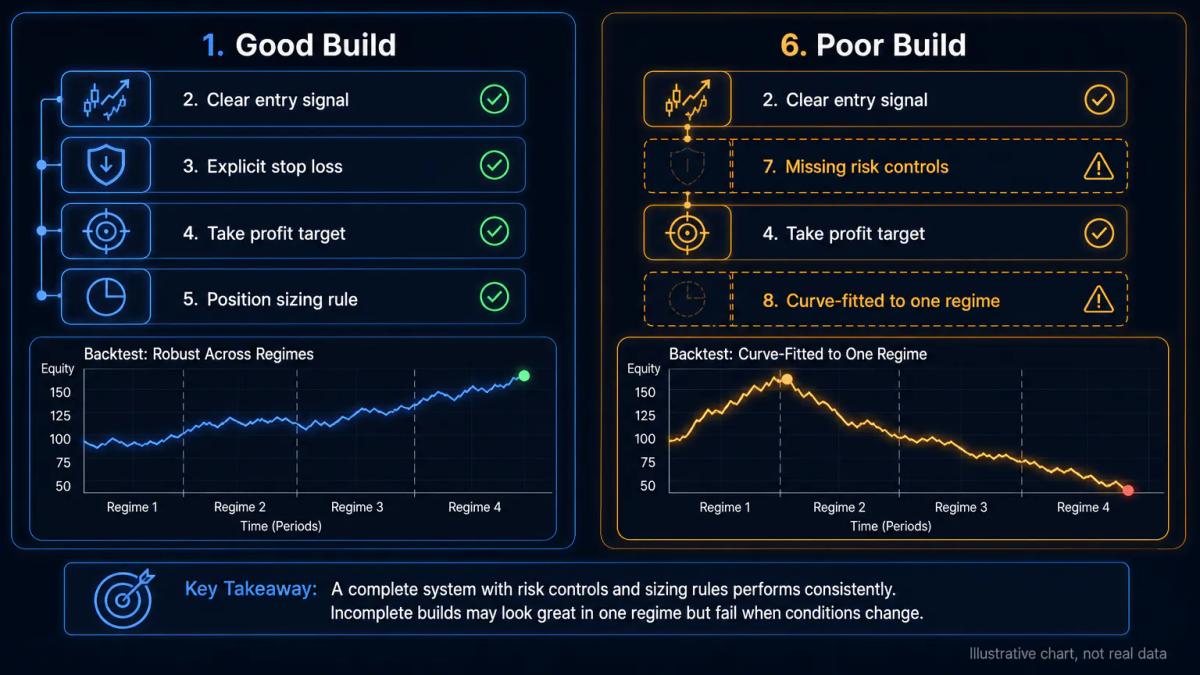
Retail-grade systems are built in TradingView Pine Script, MT4 or MT5 Expert Advisors (EAs, small programs that run inside the platform), or broker-native no-code builders. A good build combines a few ingredients that reinforce one another:
- One clear entry signal that stands on its own, so you know exactly which condition put the trade on.
- An explicit stop loss and take profit written into the code, so exits follow the rulebook rather than your mood on any given morning.
- Position sizing tied to account risk, so a losing streak drains a fraction of equity when a fixed contract count would compound the damage.
Weaker builds tend to share the same failings:
- Skipping proper backtesting, meaning running the rules over historical data.
- Ignoring slippage and commissions when the strategy report is compiled.
- Curve-fitting the logic to a single market regime, so it collapses when conditions shift.
Validate across bull, bear and sideways periods before committing real capital.
What are automated futures trading systems?
Automated futures trading systems are software that place trades on futures contracts from preset rules, with no manual order entry. They read live price data, evaluate your logic, and send entries and exits when triggers hit. They come in several flavours:
- Scripts running inside a charting platform such as TradingView, with alerts routed to the broker.
- Expert Advisors compiled for MT4 or MT5 and attached to a chart in the terminal itself.
- Cloud services that skip the retail platform and call a broker API directly.
Under CFTC and NFA rules in the United States, an individual automating a personal account falls outside registered CTA activity; distributing signals to others, however, can trigger registration duties.
Brokers and platforms that support automated futures trading
The venues below are the ones retail futures traders most often reach for when they want a system running end to end. Coverage, hosting and API access differ, so match the platform to the contracts and language your strategy is written in.
- NinjaTrader: a futures-first desktop platform with its own C#-based NinjaScript language for automated strategies, broker services on CME group contracts, and integrated backtesting.
- Interactive Brokers: offers deep futures coverage across global exchanges and multiple automation routes, including the TWS API, IBKR's native API and FIX for higher-volume users.
- TradeStation: long-established futures broker with EasyLanguage for coding strategies, plus a public API for external systems and hosted strategy execution.
- AMP Futures: a discount futures broker that connects to a wide range of third-party platforms, including NinjaTrader, Sierra Chart, MultiCharts and CQG, which suits traders who bring their own automation stack.
- Tradovate: cloud-native futures broker with a REST and WebSocket API, useful when you want to run a system from a server without a desktop terminal in the loop.
- MetaTrader 5: through brokers that offer futures on MT5, Expert Advisors written in MQL5 can be attached directly to a chart and run in the terminal or on a VPS.
- TradingView: a charting platform whose Pine Script alerts can be routed to supported futures brokers via webhooks, which is a common entry point for traders who already chart there.
- Sierra Chart and MultiCharts: third-party platforms with their own scripting environments (ACSIL and PowerLanguage) that connect through data and execution vendors such as CQG and Rithmic for direct exchange access.
Execution speed, broker connectivity, and realistic expectations
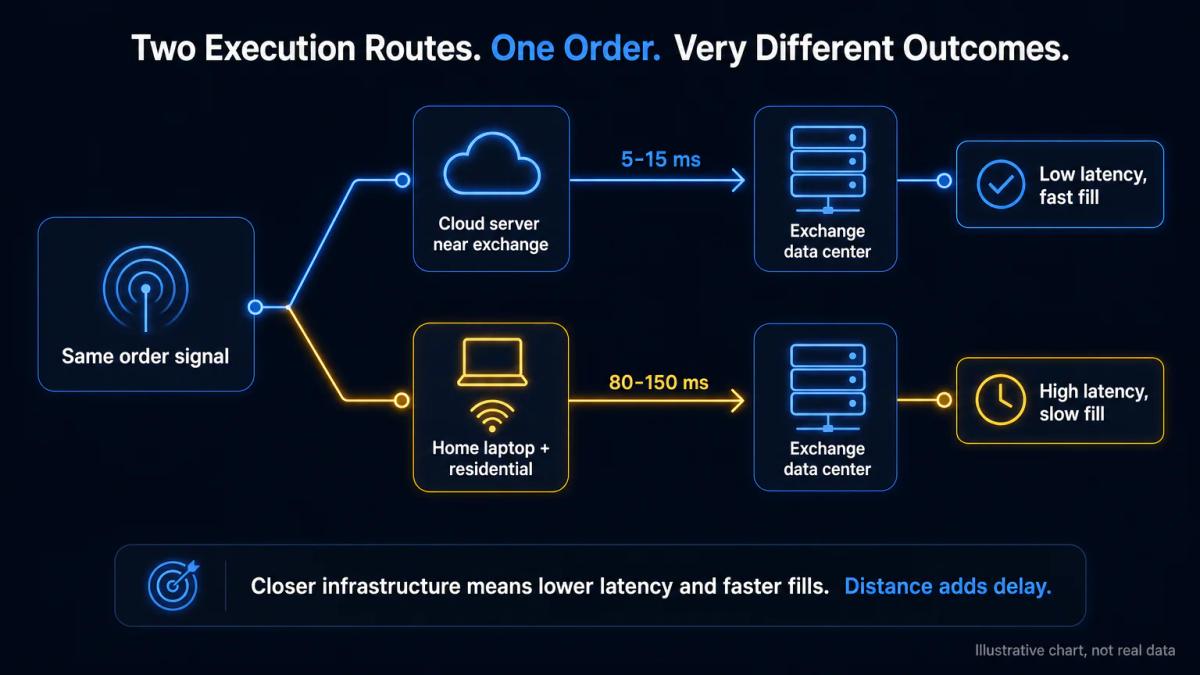
Latency, the delay between signal and fill, drives results in futures more than in slower instruments, because a few hundred milliseconds can move you a tick against yourself in a fast contract. A system hosted on a cloud server near the exchange data centre will fill faster than the same code running on a home laptop over residential internet, and the gap widens during volatile prints.
Before you commit, check that the platform supports your broker, the specific contracts you want (for example E-mini S&P, micro futures, crude and treasuries), and the order types your logic needs. Automation is best treated as a delivery mechanism, with returns still driven by the underlying strategy and whichever market conditions you happen to run into.
Risk management and position sizing rules you must set first
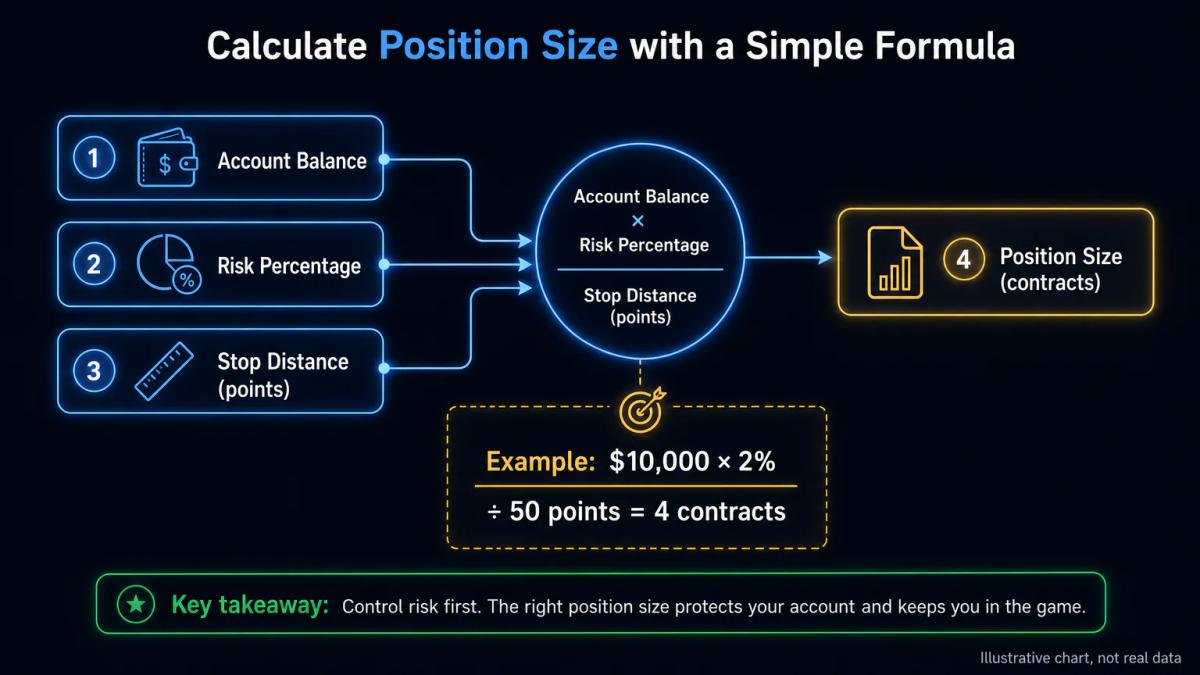
Fix your maximum loss per trade and a daily drawdown cap (the largest single-day equity fall you tolerate) before you enable any script. Position size should scale with account balance and the distance to your stop, so a wider stop pulls the size down and a tighter one lets it grow.
Imagine a fixed-size system that runs into a losing streak on leveraged futures: a single session can be enough to wipe the account, which is exactly the outcome the drawdown cap exists to prevent. Add a kill switch that halts the system when the daily cap is hit, and log every fill so you can audit slippage and commissions against your backtest.
To see these conditions applied by a regulated broker, read our Eightcap review.
Frequently Asked Questions
What is the difference between automated futures trading and manual trading?
Automated trading runs your rules through software that places orders without human input, while manual trading requires you to click each entry and exit. Automation is faster and consistent, but it also executes bad logic without hesitation.
Can you make money with an automated futures trading system?
It is possible when the underlying strategy has a genuine edge after commissions and slippage, and when risk rules cap losses during losing streaks. Returns are produced by the strategy and market conditions, with the platform simply carrying the orders through.
What broker platforms support automated futures trading?
Common options include TradingView with Pine Script alerts routed through a supported broker, MT4 and MT5 via Expert Advisors where the broker offers futures or futures CFDs, cTrader with cAlgo, and broker-native tools such as NinjaTrader and Sierra Chart. Check that your specific contracts and order types are supported.
How do you backtest an automated futures trading system?
Run your rules over historical price data across bull, bear and sideways periods, including realistic commissions and slippage. Reserve a separate out-of-sample window the strategy has never seen, and compare live paper trading before going to real capital, to reduce overfitting to past data.
What are the main risks of automated futures trading?
The main risks are strategy failure in new market regimes, execution issues such as latency and platform outages, and oversized positions that turn a normal losing streak into ruin. Leverage on futures amplifies each of these, which is why a daily drawdown cap and kill switch are essential.
About the authors


Put this into practice
Related articles

Best Day Trading Platforms: Features, Fees, and Execution Speed Compared
A structured comparison of the best day trading platforms: execution latency, spreads, FCA leverage caps, tax reporting, and the psychological tooling that separates disciplined traders from
Copy Trading Explained: How It Works and How It Compares to Social Trading
Copy trading explained: learn how copy trading works, how it compares to social trading, and which model fits your goals. Real risks and honest trade-offs.

Day Trading Complete Guide: Strategies, Indicators, and Tips for Beginners
Day Trading Complete Guide: Learn how day trading works with proven strategies, key indicators, stock screening and risk management tips for beginners.
0 comments