



How to Trade · Intermediate · 10 min read
How to choose a mobile trading app: fees, licensing and features that count
What makes a mobile trading app worth using
The best mobile trading apps combine real-time market data, low or zero commissions on stocks and ETFs, fast order execution and a clean interface you can operate with one thumb. Any sensible comparison starts with your own trading pattern: the asset classes you want to reach, the regulator you want behind the firm, and the level of guidance you expect from the broker once you have funded.
Trading from a phone imposes constraints that a three-monitor desktop setup does not: screen space is tight, mobile connections can drop, and notifications compete for your attention. A good app accepts those limits and designs around them, so when you are evaluating one, look for the following basics:
- Large tap targets for the buy and sell buttons, so a mis-tap in motion is unlikely.
- Confirmation screens before a market order fires, giving you a last chance to cancel.
- Charts that stay readable in portrait mode, without forcing a rotation to make sense of the price action.
- Biometric login, so you are not typing a password on a crowded train.
Beyond the interface, the questions worth asking are structural ones, and three of them deserve a direct answer from the broker:
- Who holds your money once it has left your bank account.
- Which regulator supervises the firm and the rulebook it has to follow.
- What the full cost of a round-trip trade actually is once you add the spread, the overnight financing and the currency conversion.
Those answers decide whether an app is worth your capital, long after the onboarding animation has finished.
Where you trade carries as much weight as how you trade; see the best forex brokers and their conditions.
Commission-free trading and hidden fees to watch
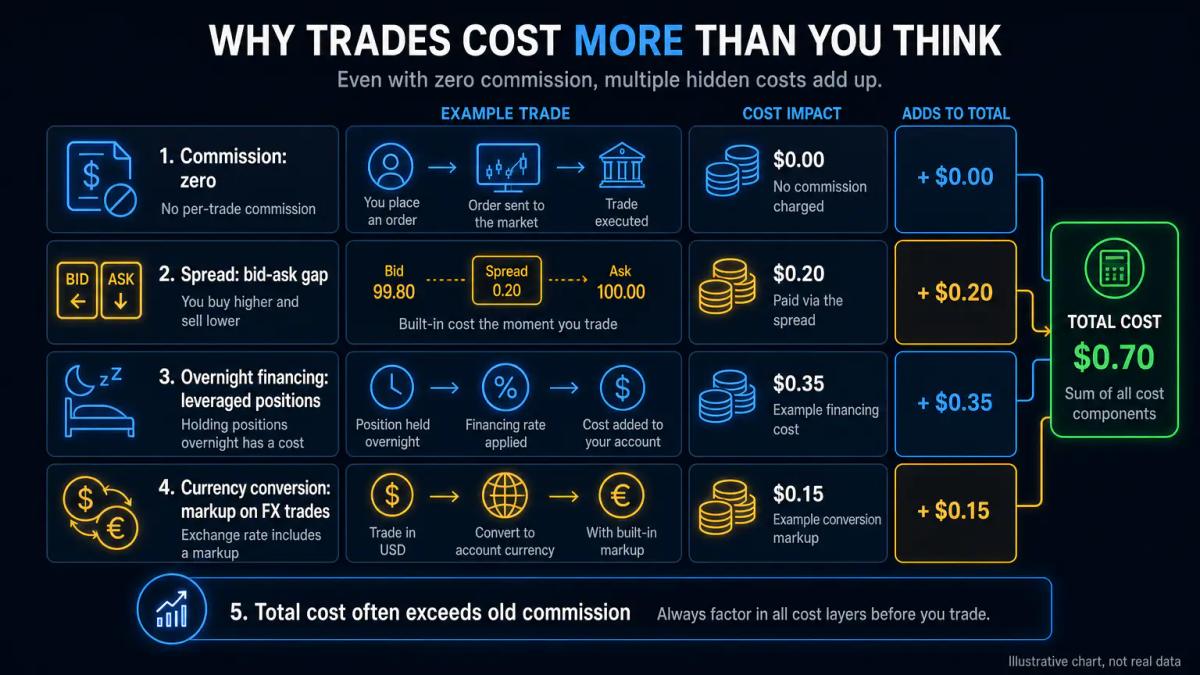
Most leading mobile apps advertise zero commissions on stocks and ETFs, yet commission is only one line in the cost stack. Combined, the spread, the overnight financing charge on leveraged positions, the inactivity fee and the currency conversion markup often exceed what a traditional broker charged in commission a decade ago.
Before funding an account, map every fee category the broker applies to the way you actually trade. The categories that bite depend on your profile:
- If you are a long-term investor buying European ETFs from a GBP account, currency conversion and custody fees are the lines to scrutinise.
- Should you trade index CFDs intraday, the spread will dominate, and overnight financing kicks in whenever a position runs past the daily cut-off.
| Fee type | What it is | Who it hits hardest |
|---|---|---|
| Spread | Gap between buy and sell price, paid on every entry | Active traders, scalpers |
| Overnight financing | Daily charge on leveraged positions held past cut-off | Swing traders on CFDs |
| Inactivity fee | Monthly charge after a dormancy period | Buy-and-hold investors |
| Currency conversion | Markup when buying assets in a non-account currency | GBP accounts buying US stocks |
| Withdrawal fee | Flat or percentage fee on cashing out | Anyone moving funds frequently |
Suppose you keep £5,000 in an account that charges £10 a month after 12 months of inactivity, and a 0.5% FX markup on a $2,000 US stock purchase. In a quiet year, you would pay £120 in inactivity fees plus roughly £8 on the conversion, before any spread.
Real-time data, charts and alerts on mobile
A mobile app's analytical value hinges on whether it streams live prices, offers charting tools that stay usable on a small screen, and lets you set price or indicator-based alerts. Depth of coverage varies between apps: some strip advanced features to keep the install light, while others reserve Level 2 data for a paid tier.
When comparing mobile charting against the broker's web or desktop platform, check three things:
- Timeframes and indicators available on mobile: some apps omit lower timeframes (tick, 15-second) or cap the number of indicators per chart.
- Drawing tools: trendlines, Fibonacci retracements and horizontal rays should sync between your phone and your desktop sessions.
- Alert types: a decent app lets you set alerts on price, on indicator crossovers (such as a moving-average cross) and on economic calendar events, delivered as push notifications.
A stop loss (an order that closes a losing trade at a predefined level) and a take profit (its mirror image on the winning side) should both be settable directly from the order ticket on mobile, in the same tap flow you use on desktop. If the app forces you to attach brackets later from a separate menu, you will lose seconds you may not have in a fast market.
Regulatory licensing and where your money sits
Your capital is only as safe as the broker's licence and the segregation rules it operates under. UK retail traders should check whether the app is operated by an entity authorised by the Financial Conduct Authority (FCA), since many well-known brands also run offshore group entities that onboard non-UK clients under a weaker regime.
FCA-authorised firms must hold client money in segregated accounts at a credit institution, separate from the firm's own balance sheet, so client funds cannot be used to meet the firm's debts. Eligible claims are covered by the Financial Services Compensation Scheme (FSCS), up to the published per-person limit, if the firm fails. Offshore entities, often registered in jurisdictions such as Saint Vincent and the Grenadines or the Seychelles, typically carry no equivalent compensation scheme.
Many well-known brands are groups with several entities. You might download the same app, but the terms route you to an FCA entity if you register with a UK address, and to an offshore entity if you register elsewhere. The onboarding small print tells you which entity holds the contract, and that determines several things in turn:
- Where you can file a complaint when the broker misbehaves.
- Which compensation scheme your eligible claims fall under.
- Which court has jurisdiction when a dispute arises.
Treat the FCA-authorised entity as the gold tier and flag anything else.
Leverage limits and margin rules for retail traders
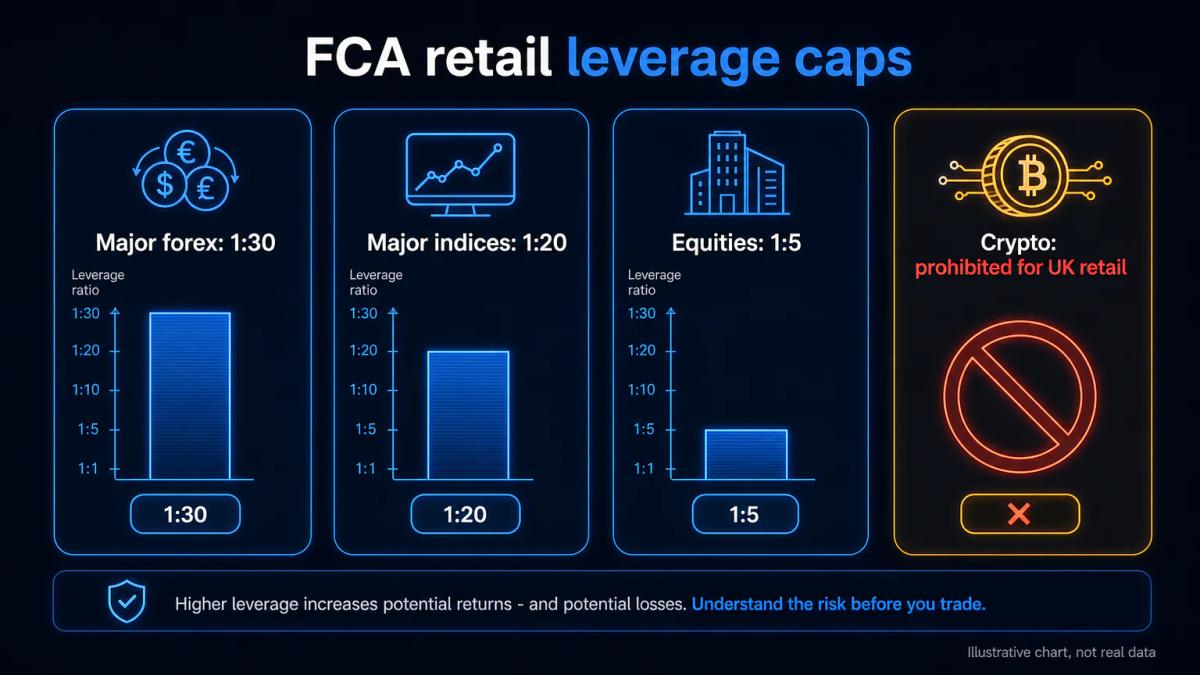
If you trade on margin, the app's leverage caps directly shape your risk. UK retail clients face FCA-imposed limits on contracts for difference (CFDs, derivatives that track an underlying asset without owning it), and those caps vary by asset class. The table below summarises the ceilings that apply.
| Asset class | FCA retail leverage cap |
|---|---|
| Major forex pairs | 1:30 |
| Major indices, gold | 1:20 |
| Non-major indices, commodities | 1:10 |
| Individual equities | 1:5 |
| Crypto CFDs | Prohibited for UK retail |
If an app advertises 1:500 leverage to you from a UK address, you are being onboarded by an offshore entity and the FCA rulebook does not apply to that contract. Before you fund, confirm which entity your account sits with and read the margin close-out rules: FCA rules require retail positions to be closed when margin falls to 50% of the required initial margin.
Asset range: stocks, ETFs, crypto, options and more
Different apps are built for different traders. The usual split runs across three groups: some concentrate on cash stocks and ETFs with fractional shares, a second tier adds forex, indices and commodities through CFDs, and a smaller group offers listed options or spot crypto through a separate licensed entity. Decide what you want to trade first, then filter apps by what they list, in that order.
A quick way to narrow a mobile trading app comparison is to check these dimensions:
| Asset type | Key features | Notes |
|---|---|---|
| Cash equities and ETFs | Direct ownership, voting rights, dividend payments | Full asset ownership |
| Fractional shares | Buy into high-priced US stocks with small ticket sizes | Useful for capital efficiency |
| CFDs on forex, indices, commodities | Leveraged, with overnight financing | FCA caps apply to UK retail |
| Spot crypto | Typically through a sister entity | Custody and withdrawal rules vary widely |
| Options and futures | Rare on mobile-first apps aimed at UK retail | Limited availability on mobile |
Imagine an app that lists 5,000 US stocks but no London-listed ETFs. It would be a poor fit if your goal is a GBP-denominated portfolio inside an ISA. The lesson is to match the venue, and not stop at the ticker count.
Popular mobile trading apps at a glance
Several apps dominate downloads and conversation among UK retail traders. The capsule view below summarises how they position themselves; always verify the current terms with the entity that onboards you.
- eToro: stocks, ETFs, CFDs and crypto, with a copy-trading feature that mirrors other users' positions. UK clients are onboarded by the group's FCA-authorised entity.
- Trading 212: commission-free stocks and ETFs, plus CFDs under a separate entity. Offers an ISA for eligible UK clients.
- IG: CFDs, spread betting (a tax-advantaged leveraged product for UK residents), share dealing and ISAs, operated by an FCA-authorised entity.
- Interactive Brokers: multi-asset access across global venues through the IBKR mobile app, including stocks, options, futures and forex, with a UK-authorised entity.
- Revolut: stocks and crypto inside a broader money app, through its investment entity.
- Freetrade: UK-listed and US-listed stocks and ETFs with fractional shares, through an FCA-authorised firm.
Treat this as a starting point. Fees, available markets and the specific entity you contract with change over time, so the terms you see on signup are the only ones that bind the broker.
Customer support and account security features
When a trade misfires or a withdrawal stalls, you need a broker that answers quickly through a channel that fits the problem. Compare each app's support channels (email, phone, live chat, in-app ticketing) and the hours they cover; a 24/5 chat gives you cover during live sessions, whereas a weekday email queue leaves you waiting through the weekend.
Security is the other half of this story. A credible app enforces several safeguards you can check during signup:
- Two-factor authentication on login and on withdrawals.
- Biometric sign-in through fingerprint or face unlock.
- Encrypted connections between your phone and the broker's servers.
- Session timeouts that log you out after a period of inactivity.
- Withdrawal whitelisting, so cash can only move to a pre-verified bank account in your name, which stops a hijacked session from draining funds to a third party.
Before funding, run through a short support test:
- Open a chat window with the broker.
- Ask a specific question about overnight financing or FX markup.
- Time the response and read the content.
If the reply is a template that does not address the question, you have your answer about what will happen when you need help under pressure.
Educational resources and news feeds built in
Many mobile apps bundle market news, an economic calendar and educational content so you do not switch between three apps to prepare a trade. Approaches vary: some brokers integrate third-party research from the likes of Reuters, Dow Jones and Trading Central, while a second group produces in-house webinars, short video courses and glossary articles aimed at new traders.
For someone still learning, the useful tests are these:
- Economic calendar inside the app: events filtered by country and impact, with alerts.
- Market news tied to your watchlist: headlines on the instruments you actually follow, filtered from a generic wire.
- A demo account with the same interface as the live app: so skills transfer directly when you fund.
- Written explainers on fees, order types and risk: produced in a reference register, with worked examples, so the material functions as a manual.
Treat education bundled by a broker as a convenience whose purpose is still commercial. The research pack that comes with an app often repeats the broker's own house view, and the content calendar is built to keep you active, which means it will rarely tell you to sit out a bad week.
Imagine you are considering a position on an index ahead of a central bank decision. A built-in calendar flags the release time, the consensus forecast and the previous number; a connected news feed delivers the headline the moment it crosses. You still decide whether to trade, but you have not lost ten minutes toggling between apps to find the data.
A mobile app earns its place when regulation, fees, security and tools line up with the way you actually trade. The ones leading with the loudest onboarding offer tend to earn attention first and trust later, which inverts the order a serious trader needs.
To see these conditions applied by a regulated broker, read our OANDA review.
Frequently Asked Questions
Are mobile trading apps safe to use with real money?
A mobile trading app is as safe as the entity behind it. For UK clients, confirm the app is operated by an FCA-authorised firm, that client money sits in segregated accounts at a credit institution, and that eligible claims are covered by the Financial Services Compensation Scheme. Enable two-factor authentication, use biometric login, and whitelist your bank account for withdrawals. Offshore entities within the same brand typically offer none of these protections.
Can you trade crypto on mobile apps in the UK?
Yes, but only in specific forms. The FCA prohibits CFDs on crypto for UK retail clients, so leveraged crypto trading through a UK-regulated broker is not available. Spot crypto (buying the asset directly) is offered by several apps through separately registered entities, with their own custody rules, withdrawal limits and fees. Treat crypto on a trading app as a different product from CFDs on equities or forex.
What is the difference between a mobile app and a web platform?
A mobile app is optimised for a phone screen and biometric login, with simplified charts and larger tap targets; a web platform runs in a browser on any device, with more screen space and usually deeper charting. Most brokers sync the account across both, so the positions and watchlists match. Advanced order types, Level 2 data and complex multi-indicator charts are often fuller on the web or desktop version.
Do mobile trading apps charge fees beyond commissions?
Yes, in most cases. Even on apps that advertise zero commission on stocks and ETFs, you will typically pay a spread on CFDs and forex, overnight financing on leveraged positions held past the daily cut-off, a currency conversion markup when buying assets in a non-account currency, and an inactivity fee after a dormancy period. Read the full fee schedule, not only the headline figure.
Which mobile trading app is best for beginners?
The best app for a beginner is one with a clear interface, a demo account that mirrors the live platform, written educational content and a short list of asset classes to focus on. For UK clients, prioritise FCA-authorised entities, FSCS cover and transparent fees over a long product menu. Trading from your phone is easier when the app does not try to show you every instrument at once.
About the authors


Put this into practice
Brokers we have reviewed
Scored on the same five dimensions. Here are three of them — the full list is on the brokers page.



Related articles

Market Structure Shift: How to Identify and Trade Reversals
A practical guide to trading the market structure shift: swing points, confluence with order blocks and FVGs, multi-timeframe checks, and risk sizing.

Options Backtesting: How to Test Strategies Before You Trade
A practical walkthrough of options backtesting: how to configure a test, read the metrics that matter, and avoid the mistakes that inflate historical returns.

Python Trading: Build, Backtest and Deploy Automated Strategies
A practical guide to Python trading for retail: from Pandas dataframes to live broker APIs, with risk sizing, backtest realism and deployment hygiene.
0 comments