



Prop Trading · Beginner · 6 min read
Prop firms that use TradingView: a trader's guide to platforms and accounts
What prop firms accept TradingView and why it matters
Prop firms that use TradingView let you trade with firm capital while keeping your own charting and analysis workflow intact.
TradingView is a web-based charting platform used by millions of retail traders; a prop firm (short for proprietary trading firm) is a company that funds traders in exchange for a share of profits. When the two connect, you place live orders straight from a TradingView chart into a funded account, without learning a new interface.
Not every prop firm supports this link, so the shortlist matters. Choosing the wrong firm forces you to switch to a proprietary platform, rebuild alerts, and re-code custom indicators. That costs both time and edge before you have placed a single trade.
To trade with a firm's capital, compare the best prop firms and how their evaluations work.
Why traders choose TradingView for prop trading
TradingView offers charting depth, community scripts and multi-timeframe views that most proprietary platforms do not match out of the box.
A custom indicator is a piece of code that draws information on a chart, for example a moving average or a volatility band; TradingView hosts thousands of these written in its own language, Pine Script. You build and test a strategy on TradingView, then execute the same setup on a funded account without redrawing anything.
Understanding concepts like moving average crossover can help you leverage TradingView's scripting capabilities more effectively.
The practical appeal is workflow continuity. You keep the same watchlists, the same alerts, the same drawings from your demo months into your funded phase. Alerts on TradingView can trigger orders directly if the broker integration supports it, which removes the delay of switching windows during fast markets.
For a beginner, that continuity matters more than any single feature: you already know the tool, so the funded challenge is about your trading, not your software.
Top prop firms that support TradingView integration
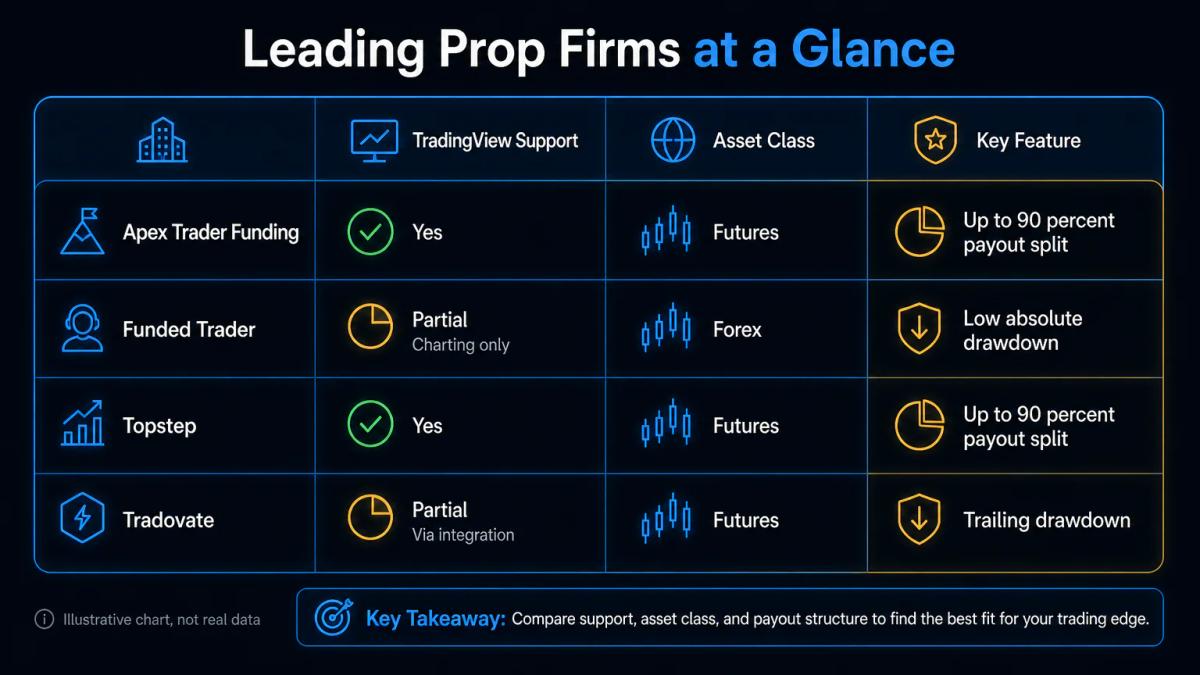
Several well-known prop firms offer TradingView compatibility, though the depth of integration varies. Some allow full order entry from the chart, others only mirror positions for viewing.
When evaluating your options, using a prop firm comparison tool can help you assess which firms best match your trading style and TradingView workflow.
The table below summarises the main options for futures and forex traders as of early 2025. Always check the firm's live documentation before you buy a challenge, because integrations get added and removed.
| Prop firm | Main market | TradingView link | Typical evaluation fee | Profit split |
|---|---|---|---|---|
| Apex Trader Funding | Futures | Via Tradovate or Rithmic bridge | $147 to $300 per account | Up to 90% after threshold |
| Topstep | Futures | Via Tradovate or TSTrader connection | $49 to $149 per month | 90% after first $10,000 |
| Tradovate (own funded programme) | Futures | Native TradingView integration | Varies by plan | Depends on programme |
| The Funded Trader | Forex, indices | Via broker bridge, MetaTrader primary | $99 to $600+ per challenge | Up to 90% |
| FTMO | Forex, indices, crypto CFDs | Read-only chart sync, orders via MT4/MT5 | €89 to €1,080 per challenge | 80% to 90% |
A point worth noting for UK readers: most of these firms operate as evaluation companies, not FCA-regulated brokers.
- Apex, Topstep and Tradovate route futures orders through US-registered brokers under CFTC and NFA oversight.
- The Funded Trader and FTMO run as offshore evaluation providers; they do not hold FCA authorisation, and the account you trade during evaluation is a demo account.
Trading a UK-facing regulated broker under FCA rules is a different arrangement from a prop challenge, and the FCA has repeatedly warned retail clients to check the FCA Register before paying any firm.
How to connect TradingView to your prop firm account
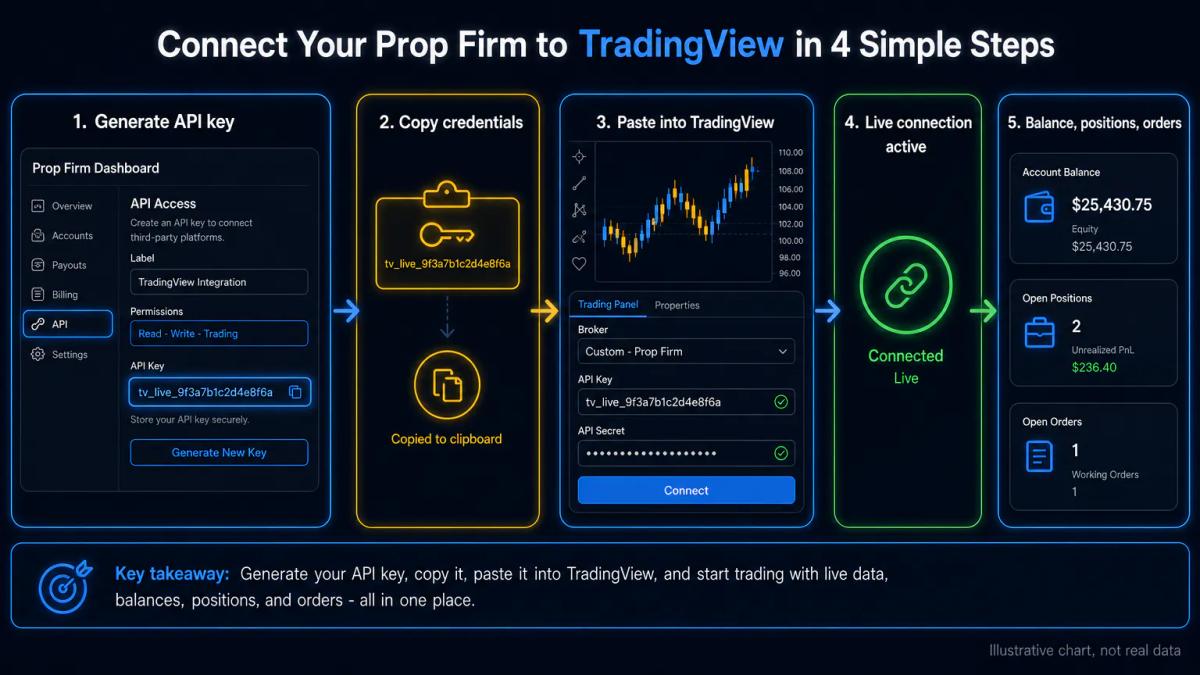
Most prop firms that support TradingView use a broker bridge rather than a direct plug-in.
In practice, you fund the challenge, receive login credentials for the underlying broker (Tradovate, Rithmic, or a MetaTrader server), then log into that broker from TradingView's trading panel at the bottom of the chart. Once connected, the panel shows your balance, open positions and pending orders next to the price.
Understanding how liquidity and execution work will help you navigate order fills and slippage during live trading.
- For futures firms like Apex or Topstep, the sequence is straightforward: buy the evaluation, receive Tradovate or Rithmic credentials, open TradingView, click the Trading Panel, select the broker, log in.
- For forex firms using MetaTrader, the link is often read-only: you chart on TradingView but click through to MetaTrader 4 or MetaTrader 5 to execute.
Confirm which mode you get before paying, because full one-click trading from the chart is not universal.
Profit targets, drawdowns, and payout structures
Prop firms vary widely in the numbers that matter. A profit target is the gain you must reach to pass; a drawdown is the maximum loss allowed, measured either from your starting balance (static) or from your highest balance (trailing).
Trailing drawdowns are stricter, because the threshold rises as you profit. Payout splits typically start at 50% and rise to 90% once you hit consistency requirements.
Withdrawal timelines vary too. Some firms process payouts within 24 hours by cryptocurrency or wire; others hold a minimum trading-day count before your first payout, commonly 8 to 14 trading days. Read the payout policy, minimum withdrawal amount, and any consistency rule, which caps the share any single day contributes to your total profit. A common beginner mistake is passing the profit target with two large days, then failing the consistency check at payout.
UK residents should treat prop trading profits as self-employed trading income under HMRC rules unless a specific accountant advises otherwise.
Understanding how a taxable brokerage account works will help you structure your record-keeping and Self Assessment return. Keep the challenge fees, payout statements and platform costs on file: they are the basis of your Self Assessment return.
Futures versus forex prop trading on TradingView
Futures prop firms such as Apex and Topstep focus on index contracts like the E-mini S&P 500 (ES) and E-mini Nasdaq (NQ), plus commodities.
Learning about E-mini futures contracts, costs, and how to start will give you the foundation to evaluate whether futures or forex prop trading suits your strategy.
A tick is the minimum price move on a futures contract, and one ES tick is worth $12.50 per contract. Forex-focused prop firms offer currency pairs and, in some cases, indices or crypto CFDs. TradingView charts both, so the platform is not the constraint; the firm is.
Before choosing, ask three questions. First, which asset class do you actually trade day to day. Second, does the firm's underlying broker support that class with reasonable spreads. Third, is the drawdown expressed in dollars or percentage, and does it fit your position size. Getting these three right is a bigger edge than any indicator.
Frequently Asked Questions
Can you use TradingView with any prop firm, or only specific ones?
Only firms that have integrated with a broker TradingView supports, or that build their own connection, allow live trading from a chart. Apex, Topstep and Tradovate connect via Tradovate or Rithmic. FTMO and The Funded Trader typically limit TradingView to charting, with execution on MetaTrader 4 or MetaTrader 5. Confirm the integration mode on the firm's documentation before paying an evaluation fee.
Do prop firms charge extra fees if you use TradingView instead of their native platform?
The prop firm itself usually does not charge more, but TradingView's own subscription tiers apply. Real-time futures data and broker integration require a paid TradingView plan, currently Essential, Plus, Premium or Expert. Some brokers also pass through exchange data fees for CME futures. Budget for both the evaluation fee and the ongoing TradingView subscription when you plan your costs.
What happens to your TradingView alerts and strategies when you connect to a prop firm account?
Your saved indicators, drawings, alerts and Pine Script strategies stay on your TradingView account and continue to work. If the integration supports order execution, alerts can trigger orders on the connected prop firm account. If the integration is read-only, alerts still fire on TradingView, but you place the order manually on the firm's execution platform.
Are there prop firms that use TradingView for both futures and forex trading?
Few firms cover both asset classes with equal depth. Apex and Topstep are futures-only. FTMO and The Funded Trader focus on forex and indices, with limited or no futures. If you want one prop account that trades both, you generally need two evaluations at two different firms. TradingView itself charts both markets without restriction.
How long does it take to withdraw profits from a prop firm after you pass the challenge?
Timelines vary from same-day to a two-week wait. Futures firms like Apex often pay within one to two business days by wire or cryptocurrency once you have completed the minimum trading-day requirement. Forex evaluation firms typically process the first payout within 14 days of the request. Check the minimum withdrawal amount and the consistency rule, because both can delay a payout even after you hit the target.
About the authors


Put this into practice
Prop firms we have reviewed
Scored on the same five dimensions, with the rules that decide payouts. Here are three — the full list is on the prop firms page.


Related articles

Same Day Payout Prop Firm: How Fast Withdrawals Actually Work
A plain-English guide to same day payout prop firms: profit splits, drawdown rules, withdrawal methods, tax reporting and the checks to run before you fund an account.

The Prop Firm Industry Is Overdue for a Shakeout - Here's What Comes Next
The prop firm model is under pressure. Here is what the industry shakeout means for funded traders and how to stay ahead of it.

Trading Stocks and ETFs Under a Funded Account: How It Differs From Futures
A plain-English guide to trading equities and ETFs on a funded account: evaluations, profit splits, drawdowns, fees, taxes and platform choices.
0 comments